Saturday, 14 March 2015

SNAPDEAL-LOOT-GET-UPTO-RS-200-BY-REFERRING-YOUR-FRIENDS-LIVE-AGAIN

Loot Live Again :)
Maximum Refers is just 3 Now.

Description :

Snapdeal is one of the biggest online shopping store in india and has many importance as they provide full country shipping without any charges and quality assured produced brought from them as snapdeal brings exciting offers on every occasions and weekends also. They have high importance because of features like free shipping ,good quality products, low prices and etc. 
Make them cheapest online store in india.

About :

When you refer a friend and he/she downloads the app and uses your referral code & link he/she will get free Rs.50 sd cash and you will get 50 for every time your referral is used.


Steps :

  1. Download the Snapdeal app -  Click here (Latest version is must so uninstall your previous appIf link not work then download from play store  then use our referral to get sd cash
  2. Now Create a New Account
  3. To Get free 50 rupees SD Cash Goto Menu > App Share Offer > Verify your mobile no. > Enter this referral code : 3395836501
  4. Now to earn more invite your Friends Both of you will get Rs.50 . 

Sceenshots :


Terms :

  • The offer is available for all smartphone users.
  • Sd cash in your account will expire in 30 days.
  • You can earn a maximum of Rs.150 sd cash while in this offer period.
Last Night Snapdeal enhanced Their Security and Somehow Manged To Release a New Version and We Started Getting Errors Like - "Please Update the Snapdeal app" or "Invalid Client Request". Somehow We are Managed to release a new modded app which can be Used in this situation also. Process is just same as we use it previously using Apps like - Donkey Guard ,Hide my root and Etc.

Here's a Complete Guide For It How To do it Because many were failed in some of the steps. Its Little Typical but if Once you became successful it will become damn easy . Have a Look below :)

Youwave / Android Lollipop Users can't Do This Trick :( --> So Don't Try 

Requirements :


How to Loot

  1. Firstly Download and Install all 5 Apps Provided above either in any Rooted Mobile (Non-Lollipop) or In Rooted Bluestacks (Get the Links Below).
  2. Now First Of All OpenXposed Installer > Framework > Install/Update.

      
  3. Now After Installing Xposed Module ,Your Phone will Automatically Reboot. Let It Open Gain Now Again OpenXposed > Modules .And Make The Following Changes.

      
  4. Now Open Root Clock and Proceed to "Add/Remove Apps". You will see a Plus Button on the Top Most at Right Side ,Click On it and Add"com.snapdeal.main". Follow the Screenshot below.

      
  5. Now Open Hide my root app and Simply Click on "Hide su binary". Then You will get a Success Message of its hiding.Incase :- If It Says Failed To Hide SU Binary make Sure You are Using Super SU App not King User / Busy Box . Make Sure that The Root Permissions are Granted.


  6. Now Open Xposed IMEI Changer and put any Value in the Fill Box and Click on apply Button. Folow the Screenshot.

      
  7. Now Its Time For Donkey Guard. Open and Goto Alphabet "S" There You will Find Snapdeal App > Settings. 
    Note : After Completing Step 8 Then Click On "System" Not Before.

      
  8. Click On Identity and Follow Step 9.

      
  9. Make the Following Changes as in the Screenshot. Make Sure You are Changes - Android ID ,Device ID ,Sim Serial Number ,Subscriber ID (Mobile Number is Optional). After Making The Changes Click On Save Button on the Top Most in Right side of the app.

      
  10. Now Go Back And Click On "System" .Now Clear The Data Of Snapdeal and After Wiping its Data Simply Open It Now. After Opening Click On "Earn Reward". Now It Will Ask Invite Code and Mobile No.


    Note You can use our Code for First Time To Support  : 3395836501
  11. After Entering Invite Code and a Mobile No. Click On Continue . Now It Will Ask For An OTP. Fill The OTP you have Received and After Filling it ,Click On Continue.

  12. Viola ! Now You Are Done . The Refferral Will be Credited Rs.50 .

      
  13. To Refer Unlimited Times Just Follow the Steps 6,7,8,9,10 and 11 again and again . Steps 1,2,3,4 and 5 have to be done Only Once.

Common Issues :
  • After sending OTP then also no message is coming then try to Clear Snapdeal app data and Try Again.
  • If You Get An Error Like - "Unable to validate this Device" Then it means you didn't Hided your SU Binary Properly or It Was Failed to be hided.
  • If You Get An Error Like - "Invalid Client Request" Then it means you are using the Official Snapdeal app not the Modded one.
  • If you face any other problem do comment we will try to find its solution and add it here :


Attachments :

Rooted BS SuperUser 0.9.6.4092 Direct Link : 
Click Here

100% guaranteed Tool to Activate Windows or Office within just 5 seconds

roysfan-actvator.jpg

An Easy Way to Activate Windows & Office Suite

Haven’t you still Activated your copy of Windows or Microsoft Office???

KMSpico is the 100% guaranteed Tool to Activate Windows or Office within just 5 seconds.

WINDOWS 10 TECHNICAL PREVIEW NOW CAN BE ACTIVATED !!!

How to Install & Activate

Uninstall any previous version of KMSpico, run first: UnInstall_Service.cmd with admin rights. (this is in the downloaded file)
Temporary Disable your antivirus software.((IMPORTANT! Otherwise KMSPico will be unable to modify Windows Registry entries that activates the Windows/Office)
Download the latest version of KmsPico From Here


Complete the installation and wait for KMSpico to run automatically.
(Optional) Create a tokens backup with the buttom: Create.
Press the Red Button.
Done.

This will Activate,

Windows 10 Technical Preview Build 9841 all
Windows Server Technical Preview Build 9841 all
Windows Vista Any Version
Windows 7 Any Version
Windows 8 /8.1 Any Version
Windows Server 2008/2008R2
Windows Server 2012/2012R2
Microsoft Office 2010 Any Version
Microsoft Office 2013 Any Version
Microsoft Office 365
Windows 10 Technical Preview WaterMark Removing Process

This Video shows how you can remove the watermark of windows 10. During this, Windows 10 Technical Preview can be Activated Automatically.


Video Guide to Understand the Process, This will make your Activation very easy.
Note: This video has been recorded using an old version of KMSpico, but now we offer the latest update which is more advance.


Special Note : Our Web site will update KMSpico to the Latest Version frequently. There will be no change video demonstration process of installing & activating as KMSpico updated.

These Activators have been developed to easily bypass every layer of protection by cracking the executable file and 100% permanently activate copies of Office & Windows.

Special Features of KMSpico

Permanent Activation : Not a Trial Activator for 30/60/90 days

Offline : You don’t need an Internet connection to activate. (both On-line & Offline Activation)

NOOB Friendly Interface : Anyone who has no expert knowledge can use this software for Activation.

Support for Versions : Windows 32-bit ,64-bit or mobile versions & any Office Version can be activated.


What is NOOB Friendly Interface?

NOOB Friendly Interface means, you don’t need to be an expert in using software & technological terms. Some of the Internet users may not have heard of terms such as Registry Patch. So this KMSpico has been developed considering all these facts, and therefore You’ll be able to handle this KMSpico for a 100% successful Activation. The Video clearly guides you step by step in case you don’t know what you are doing.

What is meant by Offline?

KMSpico is generally an Offline Installer. That is,you don’t require an Internet connection for the Activation Process. It’d also not be harmful to activate when your Connection is Online. You can decide it. OFFLINE or ONLINE, NO PROBLEM!!!

How KMSpico works with Windows Vista ?

Eventhough many people nowadays don’t use Windows Vista, our hack team has developed this kmspico to activate Vista OS. Therefore, this has facilitated few people who still works with Windows Vista. KMSpico can identify the unique system of Vista and bypass its trial period.

Why this is a Microsoft Office 2010 Product Key Generator/ Microsoft Office 2010 Product Key Generator ??

You might have been looking for a product key generator to get the activating product key for your Office 2010/2013 version. You don’t ever need such a key generator again because, your manual process of entering key & overall process is done automatically in seconds by KMSpico. So, it’s the easiest & quickest way.

How KMSpico helps with Windows 10 Technical Preview??

Windows 10 is the latest OS of Microsoft Corporation but it’s still in its preview for developers’ version. You may have already found an activation key for this operating system but even after using it, the watermark is still out there. Always seeing this is a burden. I also personally don’t like this. You can easily remove this by using KMSpico latest version we’ve given here. Just watch the video guide.

If you haven’t activated Windows 10 Technical Preview yet, then both activation & removal of watermark can be successfully completed using this KMSpico.

Why KMSpico for the activation of Windows 7??

There is a specific software “Windows Loader” to activate windows 7.(read the relevant post -on your right side). However, the same process can be done through KMSpico also. The difference between Windows Loader & Kmspico is that kms pico can activate not only windows 7 but also other windows versions and all office versions. so, basically, it’s a all in 1; Universal Package. biggrin

Windows 8 Activation

There are many Windows 8 activators,but among all those KMSpico is the best Activator, Because not only its multi-activation of Microsoft Office and Windows, but its simplicity. KMSpico can automatically identify whether your Windows 8 is activated or not. And once you press the Red Button, your Windows 8 will be activated in 3 seconds. No other Activation tool can activate both all Office versions and Windows 8/8.1/7/10

Get 50 Rs. Free Recharge using Times of India AppTrick

Hello Guys,
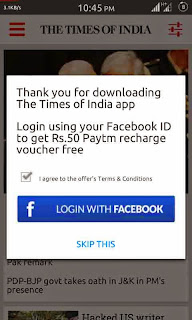
We are back again with rocking offer for 50 Rs Free Recharge Trick times of india app. this app back again with offer for 50rs Free recharge paytm coupon with fb login. this offer was live long ago but now offer is back again so get benifit from this offer

Steps for get 50rs Free Recharge
At First Install Times Of India App From Here - PlayStore Link | Direct Link
Now Open App And You will see a popup like screenshot below
50 Rs Free Recharge Trick loot
 50 Rs Free Recharge Trick loot
Open the app and you will see a pop-up (see image below)
times-of-india-login
Click on Login using Facebook button and login using your valid Facebook ID.

Once you log in successfully, you will see another pop-up window displaying your Paytm code.
paytm-code
You can use this code in Paytm mobile app to get your recharge. 
You can also view your coupon code by opening the Times of India app and then navigating to Settings > Offers. If you know more free recharge tricks then you can share it with us in comment section below.

get free 100 minutes to call without internet just download elcatalk app

Make calls,chat and send sms free with ‘Elca talk’ app,this app offers free unlimited calling withall other elca talk app users,around the world,as a promotional offer the app is also providing free 1 USD$ credits for all the users, that let’s you call anywhere in the world for Upto 100 minutes.
roysfan-elca-talka.jpg

App features:-
1)Free calls:-Make unlimited free calls with other elcatalk users without any limits,talk all day ,all night without any worries for phone bills.
2)In chat fax:-Scan as well as send fax messages from the chat thread itself,no need to perform any hard work,to send fax.
3)Free chat:-Send and receive free text messages with other Elca talk users without any limits,chat,share jokes,hangout all day with all your friends.
4)Translation:-Translate messages in 50 different languages,using this app,no need to goto any other app or website to carry on the translations.Now save huge ,you can make free calls to other Elcatalk users,and also to all other friends who don’t use,the promotional offer for free 100 Minutes is available only for a limited period.

How to begin:-
To begin just download this app from Playstore,(18mb),after downloading open the app,signin or signup for your account,you can also login using your ‘voxox’ account,after logging in you can see credits in your account,use them to call the friends who don’t use this app,to call a number just goto calls tab and input the number in international format,the call will connect as soon as your friend answers it.

elca-1.jpg
How to call offline without using data:-
By default calling is set as online,here’s how to configure offline calling.To configure offline calling just goto the app,click more > settings > click call mode and then select call connect ,input your number and done.(input your number in this format 91889837xxxx)[for india]
elca2.jpg
Now when you will make call,you will get an incoming call on the number entered,and the call will get connected once the receiver answers it.

Additional info:-
1)The gives you a free number to make or receive calls,
2)You can receive voice messages on your dedicated number,in case you are offline.

Tuesday, 17 February 2015

Reliance offering Free 2mb data for each run scored by India during this World cup


Reliance has come up with a very catchy offer to enhance the celebration of world cup season,it is offering 2 mb extra data for each run scored by the Indian team,along with 4 mb additional data if team India wins the match.


About the offer:-
This offer is available with selected data packs for each of the circles,and all 3G,2G and cdma users,the extra data will get added within 2 days of match India team scored 300 Runs in the yesterday’s match against Pakistan,so the reliance customers will get 600mb data+4 mb winning bonus,total 604 mb for free.
So this is the best opportunity for Reliance users,pray for India to score maximum runs and get free data on your mobile,this offer will definitely enhance the joy for the world cup season.

Offer duration:-13-15 Feb,20-22 Feb,4-6 March,8-10 March,12-14 March.
The packs for different circles are listed below.

Just share articles and get free Recharge upto 50 Rs from taskbucks app

We already know about the Free Recharge app taskbucks that pays us for downloading apps ,a user can redeem a recharge once he/she reaches 20 Rs ,taskbucks app is very small in size ,less than 1 mb ,so it can be downloaded easily.
this app requires no signup or login the user can instantly download the app and start using it post mobile number verification,taskbucks app gives free recharge in just 3 easy steps ,download taskbucks,open task bucks app,complete the offers,and recharge your phone instantly.
image
How to get :-
To begin just download the taskbucks app and input your mobile number scroll through the offers ,you will see many article sharing offers,keep clicking load more to view more offers.
To share just click on the offer,share it via Facebook or what’s app to your friends ,you will get the recharge when your friends read the article.
image
1. Rs for each read.
Share the offer and you will earn 1 rs each time your friend reads it the maximum limit for earnings with each of the article is mentioned besides the offer.

Airtel Offering Free MB for Facebook, Whatsapp & Youtube[2015]

airtel-trial-roysfan-jpeg.jpg
Guys, now we are going to share some cool information about Airtel’s official freebie plans. You can enjoy free Facebook, Whatsapp, Twitter and Youtube on your android smartphone. This trick is 100% working all over India and I have personally tested it in Rajasthan .Jaipur .Airtel Free FB, Whatsapp, Youtube 2015

images?q=tbn:ANd9GcRO-HetyJb8UiYoPWp-8Jr


Details:


You will get 5 MB free data daily for FB, Whatsapp and Twitter (max 25 MB daily)
100 MB for watching Youtube videos (max 500 MB daily)
After finishing free MB, you can reactivate this offer upto 5 times in a day.
Again do the same task everyday to enjoy more free data.

How to activate offer?


Visit this page and enter your Airtel prepaid mobile number > Press confirm button.
Now, you will get all information about current mobile balance and status of free data.
Just create new tab in same browser and open following links one by one to activate above plans.
Free
 Now For Facebook open 

 For Whatsapp open:

For Twitter open 

 For Youtube open 

 Twitter
Again come back to your first tab (step 1) and refresh page. You will get activation details about freebie packs.

Free call apps for android that offer free Minutes every Month


There are many Free call apps for android ,But most of them lets us make calls only if the other person uses the same app,some other offer free minutes but only one time,But there are some free call apps for android that lets us make free calls to any mobile or landline phones every month even if the other person is not using the same app,or is offline,these are listed below.


We have already posted these apps separately and today we are just clubbing all of them.

1)Bigo:-This app offers absolutely free calling Minutes to users every month ,you need to do nothing just install and use the app,get 400 free credits every month,refer your friends to earn 20 additional Credits per referral.

2)Dingaling:-Dingaling is another app that offers us free call minutes every month,the minutes get recharged on the 1st of every month,calls are connected easily irrespective of the network you are using (2G,3G WiFi OR 4G),Make free calls,send free messages,stickers,photos and videos.

3)Libon:-Libon app also offers free calls to mobiles and landlines nationally and internationally,till 31-12-2014 you will earn double minutes for inviting your friends ,earn 30 minutes per referral instead of 15,chat,call,send attachments free to your friends with the libon app.

4)Voxox:-Voxox offer free 1$ every month for calling any mobile number worldwide,it offers a free us mobile number to make calls to your friends,calling and texting to other voxox users is unlimited it also features group messaging,location sharing,friends finder.

You can download and use and try all of them ,as they reflect a very small size.

Control PowerPoint, Windows Media Player and Mouse on your Computer from your mobile phone!


Works with so many Android Phones & Tablets, Samsung, HTC, LG, Motorola, Sony Ericsson, Nokia (Series 40, Symbian S60 - NOT the Windows Phones) and BlackBerry phones!
Bluetooth Presentation Remote Control

Walk around explaining your presentation on stage (or in meeting/class rooms), click the joystick of your phone to move on to the next step/slide of your presentation. Press “2” on the numpad to go to the previous one. With WMouseXP, you have wireless control of your powerpoint presentation in your hand!

Wireless Mobile Bluetooth Mouse

With WMouseXP, your mobile phone can be used as a wireless mouse: move the mouse, left click, right click - all using your phone’s joystick. WMouseXP generates smooth cursor movement on PC, the cursor move speed increases as you hold the joystick down. When you have control of your mouse cursor, you have wireless control of your computer. What’s better is that you don’t have to use a clean surface/table like that of a real mouse. This mouse is entirely hand-held. You can use WMouseXP on your sofa, your bed, from your kitchen, virtually anywhere in the Bluetooth range - this is normally up to ten meters away!

Bluetooth Media Player Remote Control

With WMouseXP, your phone becomes the remote control of your PC-based entertainment system. Sit-back on your comfortable sofa or lay down on your bed while having full control of your Media Player from your phone - change the track, increase the volume, open your favorite movie, double click your phone’s joystick to make it full-screen. Feel sleepy? Just move the cursor to your Window’s “Start” button and shut-down the computer. Yes, that sounds nice. Just use WMouseXP to make all this happen. Bluetooth signals can even go through walls, so you can even change the song in your playlist or increase the volume while you’re in the bathroom! (but don’t get your phone wet!)
DOWNLOAD PC-App - Click to Download and Install it on your Computer (Windows XP, Windows 7,8,8.1)


The Best way to know if it works on your phone and PC  WMouseXP consists of the Mobile Side program and the PC Side program they need to connect via Bluetooth and work together, here are their requirements


How To Install  WMouseXP PC  Software


Windows 7 or Windows XP (Service Pack 2 or later) + (USB or Internal or Integrated) Bluetooth on Broadcom/WIDCOMM (1.4.2.10 SP5 or newer) or Microsoft or BlueSoleil (1.6 or newer) or Toshiba Bluetooth Driver/Stack. Tested on various Bluetooth hardware, both USB and internal Bluetooth.
Download Here


HOW  To Install Mobile App..

Android: Android 2.1 or later.


you can download this apk file.


 Java


BlackBerry: Generally most BBs (j2me + jsr-82) should work - Tested on Blackberry Curve 8520, Torch 9800.

Java-enabled (j2me) phones: needs the Java Bluetooth API (JSR-82) - generally all new Series 40, S60, Symbian, also tested and working on Samsung Jet, Motorola Razr, SonyEricsson K700, etc.

Java-enabled phones that match: - Nokia 2710, 3250, 3710 Fold, 3711 Fold, 3720 classic, 500 Fate, 5228, 5230, 5232, 5233, 5235 Comes With Music, 5250, 5320 XpressMusic, 5330 XpressMusic, 5500 Sport, 5530 XpressMusic, 5630 Xpress Music, 5700 XpressMusic, 5730 XpressMusic, 5800 XpressMusic, 600 Cindy, 6110 Navigator, 6120 classic, 6121 classic, 6122c, 6124 classic, 6210 Navigator, 6220 Classic, 6260 Slide, 6290, 6303 classic, 6350, 6630, 6650 Fold, 6680, 6681, 6700 Slide, 6720 Classic, 6730 Classic, 6750 Mural, 6788, 6790 Mako, 700 Zeta, 701 Helen, 7020, 702T, 7230, 7510 Supernova, C1-01, C1-02, C2-00, C2-01, C2-02 Touch and Type, C2-03 Touch and Type, C2-06, C3-00, C3-01 Touch & Type, C5-00, C5-01, C5-03, C6-00, C6-01, C7-00, C7-00.1 Astound, C7-00s Oro, E5-00, E50, E51, E52, E55, E6-00, E60, E61, E62, E63, E65, E66, E7-00, E70, E71, E72, E73 Mode, E75, E90, N70, N71, N72, N73, N75, N76, N77, N78, N79, N8-00, N80, N81, N82, N85, N86, N90, N91, N92, N93, N95, N96, N97, N97 Mini, T7-00, X2-00, X2-01, X3-00, X3-02, X5-01, X6-00, X7-00 - Samsung GT i7110, GT i8510 Innov8, GT i8910 Omnia, SGH G810, SGH L870, SGH i400, SGH i450, SGH i455, SGH i550, SGH i560 - LG KS10 Joy, KT610 - Sony-Ericsson U1 Satio, U5 Vivaz, U8 Kanna


..you can download this jar file.


How To Connect With Your Pc.

If your computer does not have Bluetooth then you can get a cheap USB Bluetooth dongle, preferably one which comes with a Broadcom driver.


Step1.Open phone’s Bluetooth Settings, set visibility to “Discoverable” so that it can be discovered from PC.
Nokia: Go to Menu > Settings > Connectivity > Bluetooth > My phone’s visibility = “Show to all” or “Define period” as in screenshot below. (Setting to “Hidden” would cause the connect or search/pair to fail!)
nokia_bt_set_temporary_visible
Android: On home screen, press the “settings” button (the “3 stripes” button on bottom of screen) and choose “Settings” > Wireless and Networks > Bluetooth > Check the “Visible” or “Discoverable” box.


Step2. Start pairing from PC - On Computer: right-click on the Bluetooth icon in the bottom-right system-tray and choose “Add a new Bluetooth device” - or go to the Bluetooth settings in Control Panel and select “Add”.
Add a Bluetooth Device
Follow the steps as per your computer’s Bluetooth software, you can normally choose an easy numeric pass-code, like 0000, then your phone would notify and ask you to enter/confirm that code, then the pairing would be done.
3 - Click here to Download WMouseXP “PC App” - install on computer, start it.
[img]http://roysfan.heck.in/files/connect-now.jpg[/`img]
Get your phone’s “WMouseXP Mobile ID” shown in your mobile app (this is actually your phone’s Bluetooth address) - Enter it into the PC app, then press the “Connect” button. Done!

Connected Successfully?


Press 3 (if touch-sreen: touch the presentation icon at top-right) on the phone to start the presentation.
Click/press the phone’s joystick (middle button) (or OK button on Samsung touch phones) for the next step/slide. Press 2 for the previous slide.
Use the joystick (if touch-screen: use the on-screen joystick arrows) to move mouse cursor and point where you want.
Press 1 (if touch-screen: top left “Esc” icon) to exit the presentation.
Press 5 (if touh-screen: tap on the media icon) to start your media player, open a playlist, try the next/previos track, play, pause, stop, mute and volume control buttons.
Instructions for Android - Samsung, HTC, LG, Motorola or Others:


Tap the Presentation remote button to start the presentation.
Change presentations slides by pressing your phone’s Volume control buttons on the side of your phone: + for next step/slide, - for previou slide.
Tap the “door” icon (bottom left) button to exit the presentation.

You can use the on-screen joystick buttons (in “Mouse” tab) to move the mouse cursor and click on things.
In the “Media” tab, tap the media player icon to start your media player, open a playlist, try the next/previos track, play, pause, stop, mute and volume control buttons.
Instructions for BlackBerry:

Press 3 on your BB to start the presentation.
Use the Volume control buttons on the side of phone: + for next step/slide, - for previou slide.
Use your BlackBerry keyboard keys: I,J,L,M as the joystick to move mouse cursor and point where you want (instead of the trackball or trackpad).
Press 1 to exit the presentation. Please see the BB command-map shown for more info:
Press 5 to start your media player, open a playlist, try the next/previos track, play, pause, stop, mute and volume control buttons.


i hope you like our post if any problem then plz comment your feedback.........share with your frnds

Monday, 2 February 2015

Free Airtel Net Using Uc bowser working 2016


Hi   today i am sharing a new trick free Airtel On  ANdroid & java working handler trick on uc
Step 1 download handler browser u want from google any where
step 2 use default setting in mobile airtelinternet or airtel live
step3  Now open your handler browser and open setting >handler setting then make some change
procxy  type>> Real host
procxy server>> bsbportal.com
save setting  enjoy free airtel
only 50 mb data use in one senssion


Download   Java Handler

Download Android Handler 
NOte >>. try on low balance its working at Many state i am from jaipur

Wednesday, 7 January 2015

how to write yourname‬ in stylish font on Fb


HERE IS THE TRICK BUT THERE IS SOME ‪#‎LIMITATION‬ OTHERWISE IT WILL SAYS INVALID CHARACTERS 
read it carefully 
1) ONLY ONE UPPERCASE LETTER
2) USE ONLY ONE TYPE ON LANGUAGE
‪#‎Ukrainian‬, Russian, Cyrillic letters
Next is Ukrainian alphabet and some other symbols from Russian and ancient languages.
А Б В Г Ґ Д Е Є Ж З И І Ї Й К Л М Н О П Р С Т У Ф Х Ц Ч Ш Щ Ь Ю Я
а б в г ґ д е є ж з и і ї й к л м н о п р с т у ф х ц ч ш щ ь ю я
Ё Ѫ Ѧ ѳ ы ѣ Ѣ ъ ψ ξ
‪#‎Greek‬ letters and characters
Α Β Γ Δ Ε Ζ Η Θ Ι Κ Λ Μ Ν Ξ Ο Π Ρ ϴ Σ Τ Υ Φ Χ Ψ Ω ∇
α β γ δ ε ζ η θ ι κ λ μ ν ξ ο π ρ ς σ τ υ φ χ ψ ω ∂ ϵ ϑ ϰ ϕ ϱ ϖ
‪#‎Połish‬ language
ą ć ę ł ś ó ż + all Latin (English).
Africa Alphabet
‪#‎Africa‬ Alphabet
UPPERCASE A B Б C D Ɖ E Ɛ Ǝ F Ƒ G Ɣ H X I J K L M N Ŋ O Ɔ P R S Ʃ T U V Ʋ W Y Z Ʒ
lowercase a b ɓ c d ɖ e ɛ ǝ f ƒ g ɣ h x i j k l m n ŋ o ɔ p r s ʃ t u v ʋ w y z ʒ

Top 10 Sites To Make National And International Phone Calls For Free

When we talk about making phone calls from our PC through internet, we think of  instant messaging services like Yahoo Messenger and Google Talk which provides PC-to-PC voice calls.
But they have one limitation that you can call only the person who has computer and connected to internet, otherwise they are of no use. Anyways, we are not talking about PC-to-PC calls in this article, we are going to talk about PC-to-Phone calls.
There are numerous websites which provides voice call services totally free of charges. Yes, without any call charges you can talk to your friends, relatives or anybody staying in any part of the world.
The only downside of these websites are that they have some limitations like advertisements, registration required, limited number of calls or duration of the call. But, mentioning them here is worth it because these websites can surely come handy by saving lots of money you spend on making phone calls and mostly that on international calls.
1) Evaphone : EvaPhone provides Internet telephone calls for free. Their website offers free VoIP call solutions which lets you make PC-to-phone free international calls.
The only limitation with this service is that duration of the free call varies in which country the call is made and the line provider.
2) FreeCall : It is a application which can be downloaded in your PC to make free calls to more than 50 destinations. You can make 300 minutes of free calls in a week to pre-defined free destinations. Unused minutes cannot be forwarded to next week. Please check this link to know destinations in which free calls are provided.
3) Calleasy : This website offers you free calls to the countries with rates below than 5 eurocents/minute. You can make calls through your PC as well as with your mobile. You can check this link to check the rates for every destination listed and start making free calls.
4) PokeTalk : PokeTalk offers free international calling to over 50+ countries worldwide. You don’t need any headphones, adapters, no download required. You can make up to nearly 50 calls per month, with a limit of 10 minutes per call. You can check this link which will lead you the free destinations available. Desktop Gadget is also available  for Windows and Mac users and you can also make calls from website.
5) Flash2Voip : Flash2Voip allows you to make free international calls to over 30 countries right from your browser.  No need to download and install anything but simply register on the site and you are good to go.
6) MediaRing Talk : MediaRing Talk for Mobile lets you enjoy free mobile-to-mobile calls to and from anywhere in the world. Paying no roaming charges, you can stay in touch with friends, family or even business associates while on the move and not worry about incurring expensive IDD charges. Free calls from PC to phones can be made to 8 global destinations which are USA, UK, Canada, China, Singapore, Australia, Taiwan & Hong Kong.
7) Globe 7 : Globe7 is a tiny application integrated with Soft Phone, IM, Videos, Games, News and many more opt-in widgets for your complete entertainment, information and communication. WIth Globe 7, you can not only just make free calls but also watch free videos, play free games, free live, free live radio, send sms, upload and share files etc. The best part is this software is available for Windows, Mac, Linux and mobile users.
8 ) Goober YouCall : Register yourself with a free account, no download required. Enter your phone no., enter your destination no and your call is made. The only limitation is that duration of call according to the destination you call. Your account is pre-filled with some credits while you register yourself which you can use to make free calls.
9) iCall : iCall uses Voice Over IP (VoIP) technology which utilizes your existing Internet connection (cable, DSL, wireless, or dial-up) and your PC to plug you directly in to the regular telephone network. iCall gives you option to download the software for PC or you can make call directly from the browser. iCall is also supported in iPhone, iPhone 3G and iPod touch.It only provides free calls to US and Canada when you make calls from the browser and the duration of each free call is 5 minutes.
10) Jaxtr : First sign up for a free account. Enter your number and then the destination number. Jaxtr will give you a local number, dial it from your phone. When it prompts, make a call to your friend’s number.
3 more bonus websites to make free phone calls
11) Adphone : Sign up for a account, download a application on your desktopand Adphone gives you 30 minutes free every day to make calls on landline phones. calling on landline phone . PC to PC calls is always free by Adphone.
12) VoipBuster : VoipBuster is a free program that uses the latest technology to bring free and high-quality voice communications to people all over the world. When you use the free VoipBuster software, you can call regular phones in various popular destinations for free or call at an incredible low rate to any other phone on the planet. You can make only 3 calls per day as per their terms and have to download a software on your computer.
13) WebCallDirect : WebCallDirect offers free* calls to any regular land-line in various popular destinations. To counter misuse of their network they have limited these free* calls for trial users.
I hope this list will help you to save your money on making phone calls. And if you know some other services other than mentioned above, feel free to share with our readers in the comments section below.