Tuesday, 2 February 2016

How To Send Multiple Facebook Friend Requests At Once

Send Multiple Facebook Friend Requests At onceThe social giant Facebook being used by billions of people today and this network is famous worldwide. Almost all users spend their time by chatting with their friends, sharing pics and videos on Facebook and liking different cool pages, joining many groups and making new friends. And if you had created a profile and looking for the friends that you find around you and then you keep on sending friend requests by clicking on Add a friend button again and again. So here we have a cool solution by which you can easily send Facebook request to the multiple persons with a single click. Yes its possible you can do this with a simple guide that we are going to discuss right here. So have a look on complete guide discussed below to proceed.


Steps To Send Multiple Facebook Friend Requests At Once:

  • First of all you must have the latest version of Google chrome as the extension we are going to discuss right here might not work perfectly with the older version of Google Chrome.
  • Now in your Google chrome add the extension Facebook Social Media Toolkit.
  • Facebook Social Toolit
  • Click on Add to Chrome button there and a popup will appear and click on Add Extension button.Facebook Social Toolit
  • Now the extension will start downloading and within few seconds it will get added to your browser depending upon your internet speed.
  • Now login into your Facebook account and where you want to add many friends in a short time.
  • Now search for friends or open the Recommend Friends list.
  • Now click on the extension you installed and under the free section click on Click on All Add friends Button.Facebook Multiple Requests
  • Facebook Multiple Requests
  • Now a confirmation popup will appear to verify the request sending, just confirm it.
  • That’s all and you are done, now all the friends will receive your friend requests.
So this is all about How To Send Multiple Facebook Friend Requests At once , Use this cool guide that we discussed above and you can send multiple friend requests with a single click. Hope you like our work, keep on sharing with others too. Leave a comment below if you have any related queries regarding this.

Earn Rs.10 Free Recharge Daily From BalBoa Coin App

BalBoa Coin, an app which gives you daily Rs.10 free recharge by doing simple task of 5-10 minutes. Yes, in BalBoa coin you don't have to download any third party app to grab free recharge, here you just need to click on 5 ads and earn Rs.10. Task will hardly take 4-5 minutes and recharges are also instantly so its a great opportunity to grab Rs.10 recharge daily without doing any big task.
Steps To Follow :

1. Download BalBoa Coin App from Here .

2. Once you download, create new account and enter this number in Referral code :9782664822  and verify it.

3. After successful verification, open app and click on Back Button.

3. Now you can see App Dashboard, now goto Rewards section and there you can see some ads just click on it.

4. Once you click ads, you will be redirected to PlayStore, just wait for 5-10 seconds.

5. Now Press Back button and then you can see popup showing "Click 4 More Ads".

6. Keep clicking ads & press back then refresh app to check your balance.

7. Per ads you will get Rs.2, once you earn Rs.10 you can redeem it from Recharge section.

* You can recharge any number and all recharges are instantly.

* Per day you can click maximum 5 ads.

So keep clicking 5 ads daily and earn Rs.10 free recharge. Do not forget to comment below for more queries regards this app.

Sunday, 31 January 2016

HOW TO SET PASSWORD ON ANY APPLICATION IN PC

Hello friends, today I am going to tell you a trick to make your pc softwares password protected. It means whenever anyone open any software in your pc then he/she will be asked for a password if the user don’t know the password then he can not use the software.
If you are interested to protect your pc softwares with password then
PClock_computerlock.png
 just follow below steps
 STEP 1: First of all download a software named Password Doorto your pc
 Download: 594.85 KB

STEP 2: Now install it to your pc, while installing , it will ask you to enter a password which will be used to open the password protected softwares.

STEP 3: Now open Password Door with the help of password which you have entered while installing Now Click onprotect a program.

STEP 4: Now You’ll see a list of all program on which you can set password. Select the app from the list and make it password protect. Now whenever you or any other user open password protected app, app will ask for the password. if you know the password only then you can access the application. You can remove password from apps anytime.

NOTE: If you are thinking, your little bro or sis uninstall Password Door to access the application, then they can’t do it, because this program will ask for the same password to uninstall it from pc.
 ” ENJOY & WAIT FOR NEXT

Whatsapp for java

it is widely known that Whatsapp is now the Best and popular Chatting App across all Mobile Phone platform in Nigeria and other part of the world, Whatsapp is the opposite of Blackberry Messenger which is known as BBM. Now, not only blackberry users can ping with their phone, but all Nokia phones. etc can ping using 
whatsapp.jpg
 Whatsapp has become so popular that even Blackberry Users make use of it as a perfect substitute.

 But the problem is that,  Whatsapp does not work on NokiaX2-05 and C5,C2 and since i have a friend who owns a Nokia X2-O5, she want to whatsapp. this led me to find solution online, i came across a lot, most of them are not working, but with a little twist, i have figured out how to make it work. So hurray to all those who have Java phones, you can now install whatsapp on your java phone.
Nokia-Introduces-Low-Cost-3G-Phone-C2-01

How To Use Whatsapp On Your Nokia X2-05 or C2

Follow the steps below to configure your Java phone to chat with wahtsapp. 

Step 1. Search for anyone that use WhatsApp on his/her Phone, you can contact your friends that has a higher phone that accept whatsapp without tweaking.


Step 2. You will need to copy the file to your Nokia Phone to make it work, so what you need to do is to COPY the whatsapp Application to his/her Phone Memory. (this step is very crucial) 

Step 3. Now after coping the app to the phone memory of your friend, remove your friend memory card from his/her phone and then insert your own Memory Card into your friend phone and then paste the WhatsApp app. you copied on step 2 to your own memory card.

Step 4. After you have successfully copied and paste the WHATSAPP APP, in your own memory card. Remove your memory card and insert back to your own phone.. (No need to Installation it), The whatsapp App will auto work.
 Whoops! you are set to start to chatting on your mobile phone.
Nokia-Asha-300.png
If Any Problem just simply install this.....  I hope its work for you..
Install WhatsApp Now
Important Notice: You can use this method to Install WhatsApp application to all Mobile Phone that is not Officially Supported by WhatsApp Inc.

Let us know if this is not working for you, so long you can insert memory card on your phone, then you can use whatsapp to chat.
share this info with your friends on twitter and also on facebook.

Saturday, 30 January 2016

Airtel Free 3G Internet Trick for Pc {2016}

 Airtel-3G-Mobile-Services-Now-In-Chennai 
Hy guys, back with Airtel Free 3G Trick 2016 …
This Trick is based on latest host of Airtel…With this Airtel Free 3G Trick 2016
 you can use 200Mb daily without any data pack or balance…
so don’t waste time and get Airtel Free 3G Trick 2016

 Trick from below - 
Airtel Free 3G Trick 2015 Features Of This Trick – 
I) 250 Mb Daily Limit
 II)Working On Ublocked Sim
 III)Working On Most States
 IV)Speed Approx 600Kbps In 7.2Mbps Data Card
 V)Working With Defalt Apn
 VI)Enogh For This 

Trick Requirements For This Trick –
 I)Apn – Default (Airtelgprs.com )
 II)Small 3G Pack Id You Want Better Speed
 III)Pc… Airtel Free 3G Trick 2016 Download The Trick From Here Airtel Free 3G Internet Trick for Pc


 If You Have Any Isses While Using This Trick then Comment Below Or Join us on Facebook

Whatsapp Backup Decrypter Want to read your friend’s private messages?


Want to read your friend’s private messages? Is your girlfriend cheating on you? How to find out?! The latest encryption of whatsapp backup “crypt8″ has not been decrypted by anyone. No worries smile
We bring you, this amazing tool, using which you can decrypt the crypt8 whatsapp backups.
 smile 
Follow the instructions carefully. Your phone must be rooted!
Steps
  • Download the Whatsapp Backup Decrypter archive given below and extract the folder wp to your C drive . It must be like this C:\wp
  • It contains four folders, namely backup,data,output and tmp, and the Whatsapp Backup Decrypter tool.
  • Go to /data/data on the victim’s android phone and copy com.whatsapp folder to “data” folder in wp. [C:\wp\data\]
  • Go to sd card/Whatsapp/Database on victim’s phone and copy “msgstore.db.cryp8” to backup folder. [ C:\wp\backup\ ]
  • Open the Whatsapp Backup Decrypter tool located inside wp folder, and press Decrypt
  • Your done! smile
  •  The decrypted database will be in C:\wp\output
  • You can view the decrypted database using any SQLite viewer or Whatsapp Viewer(download link provided below)
  • Downloads


Make your Computer Welcome You

Make your Computer Welcome You
 
Do you watch movies? Have you always loved the way how Computers in movies welcome their users by calling out their names? I bet that you too would want to know how you can achieve similar results on your PC and have a computer said welcome. 

Then you are at the right place, this article describes exactly how you can make your computer welcome you like this.

With this trick, you can make your Computer welcome you in its computerized voice. You can make your Windows based computer say "Welcome to your PC, Username."


  1. Make Windows Greet you with a Custom Voice Message at Startup
Click on Start. Navigate to All Programs, Accessories and Notepad.
Copy and paste the exact code given below.


 3.  Replace Username with your own name. 


 4.  Click on File Menu, Save As, select All Types in Save as Type option, and save the file           as Welcome.vbs or "*.vbs".

 5.  Copy the saved file. 


6.  Navigate to C:\Documents and Settings\All Users\Start Menu\Programs\Startup (in Windows XP) and to C:\Users\ {User-Name}\AppData\Roaming\Microsoft\Windows\Start Menu\Programs\Startup (in Windows 8, Windows 7 and Windows Vista) if C: is your System drive. AppData is a hidden folder. So, you will need to select showing hidden folders in Folder options to locate it.


  7.  Paste the file.


 Make your Computer Welcome you at startup

Now when the next time you start your computer, Windows will welcome you in its own computerized voice. 

Note: For best results, it is recommended to change sound scheme to No Sounds.
You can change the sound scheme to No Sounds by following the steps given below:-
Go to Control Panel.
  • Then click on Switch to Classic View.
  • Then Click on Sounds and Audio Devices.
  • Then Click on the Sounds Tab.
  • Select No Sounds from the Sound Scheme option.
  • If you wish to save your Previous Sound Scheme, you can save it by clicking Yes in the popup menu.
  • Click on OK.
  • Change Sound Scheme to No Sounds

Tuesday, 26 January 2016

CLICK ADS AND EARN FREE RECHARGE DAILY FROM FREECOIN


earn daily free recharge of Rs.7 by clicking on few advertisements. Here you don't have to download any app or register in any website, just signup verify and start clicking ads. Daily you can earn Rs.7 in just 2-3 minutes so lets proceed and check out this app.
Frcoin 1
Steps To Follow :

1. Download Freecoin App from Here .

2. Once you download, enter this number in Referral code : 9782664822

3. Now verify your number and proceed.

4. Finally you will be redirected to app dashboard.

5. Now goto Free Coins section & start clicking on ads.
Screenshot 2016-01-23-17-56-10-964
Note : Don't click on pop up ads, you need to click on ads which placed in Free Coins section.

6. Once you click on ads, you will be redirected to Playstore or webpage, just wait for few seconds & click back button.

7. Now you can see, "Thank you, Successful" on screen that means Rs.1.50 credited in your account.

8. Follow same process again and again & grab Rs.10 to recharge.

* You can redeem your earning as Free Recharge minimum recharge amount is Rs.10

Keep clicking ads and earn Rs.7 daily i.e Rs.250 per month by spending few minutes of your precious time. Enjoy this app & keep sharing with friends also.

Note : 

1) Per dynamic tasks you will get 1.5 Rs.

2) You can do maximum 7 tasks per day as of now 

new Reliance 3G Unlimited trick working almost everywhere


 new Reliance 3G Unlimited trick working almost everywhere but as I guess will work all over India and this trick serving several benefits like no sim blocking issues, no speed capping issues and many more.You Need Troid VPN or other VPN app for this trick.
Reliance 1
Steps To Follow :

1) You Need 3G Enable SIM for this Trick and Small 3G Data Pack Required with Unlimited Twitter,Facebook (I recommend Rs.197/- or 177/- with 1.25 GB 3G Data or whatever Unlimited FB,TW,WA for 28 Days which is Available in your City)

2) First Download Troid VPN from Play Store

3) Open Troid VPN App and Select any Free Server After Fill up in Rport: 443 & Lport: 0 and Change protocol UDP to TCP like Shows on Screenshot

4) Click On Advance Button Put in this

Proxy on Proxy Host: 107.170.237.191 
Proxy Port: 8080
Header: m.twitter.com/@ or blog.twitter.com/@ 
Rim1
5) And Save it and Connect.
Rim2Rim3Rim4

Note : Download Limit is only 150 MB Per Day But If You want Unlimited You Need Rooted Device with Xposed and Xprivacy Installed Xprivacy Using Instructions See in Screenshots.
XoseXose1
Xose2Xose3Xose4

Tuesday, 28 July 2015

(Expired)Alive App Loot - Get Rs.50 Paytm Recharge Coupon Free [Unlimited Trick]


Alive App (Launched By Times Mobile) giving Free Paytm recharge coupon worth Rs.50 by just signing up. Just Like TOI / Gaana Coupons you will get Flat Rs.50 Discount on Recharges of Rs.50 or more. Means Absolutely Free recharge of Rs.50 .Hurry this may end anythime !! Unlimited Loot Trick Also Provided.

In order to get your Free Reward - You need to Sign up in Alive App with Your Facebook ID only.

How to Get The offer :-

  1. Firstly Download Alive Android App from Play Store - [Click Here]
  2. Open Alive app and Click on "Log in with Facebook" button.

  3. Allow Alive app to access your Facebook Account Details.
  4. Now You are Successfully Logged into your Account.
  5. Open Alive app Menu > My Rewards.
  6.  You will find your Free Paytm Coupon code there.


How to Redeem Paytm Coupon :-

  •  Download Paytm Mobile App - [Click Here]
  • Login to your Paytm Account.
  • Move to Recharges > Prepaid / Postpaid.
  • Enter Mobile / Operator / Amount.
  • Click on Proceed to pay.
  • Enter the Given Promo code and click on Apply.
  • Once Applied Click on Recharge Now !!
    P.S. If amount is more than Rs.50 you need to pay rest of the amount !

Terms and Conditions :-

  • Valid for New Alive App users only.
  • Paytm Coupons are valid upto 15th August 2015
  • Paytm Coupon can be used only once per Number/Email/Account.
  • Valid for First time app users only (Once per Device).
  • Maximum Discount is Rs.50 Only.

Unlimited Trick :-


  1. Donkey Guard
  2. Xposed Module must be installed if not get it - Download
  3. Xposed IMEI Changer
  4. Android ID Changer


Mobile Device :

  1. After getting Coupon for First time now Simply Clear Alive App Data.
  2. Install Android ID Charger and Change your Android ID (Root Required).

  3. Change IMEI with Xposed IMEI Changer
  4. This Trick is Working without Donkey Guard also - But for safe side we will suggest you to use Donkey Guard as well to change the "Identity" Values of Alive App.
  5. Open Alive app and Sign in with a New Facebook ID this Time.(If you have Facebook app installed the Disable it / Uninstall it while looting as it will take much time).
  6. Now After Successful Login go to "My Rewards" and Get you Coupon.
  7. Follow Above steps to loot again and again.

PC / Laptop :
  1. Open Youwave / Bluestacks.
  2. Install alive app and Login with a facebook ID .
  3. After Successful Login go to My Rewards and Get you Coupon.
  4. Now Factory Reset Youwave or Clear Data of Alive app in Bluestacks.
    BS Users : 
    Open BS - Tweaker and Change Android ID then Reboot BS.
  5. Now Again Open Youwave / Bluestacks follow same process with a new Facebook ID.
Visit here to know how to make unlimited facebook ids without Mobile Verification or Email.

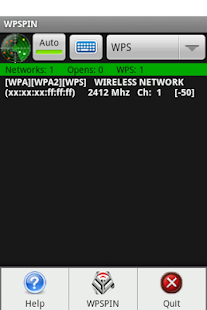
Hack-wifi-password-with-android-using-wpspin-app

If you have ever used wifi then at some point thought about hacking wifi may have crossed your mind. Hacking wifi through backtrack/reaver is a long and tedious process. Here in this post, I’d like to share a tutorial on how to hack wps enabled wifi network from android.

Note:- Process cannot be carried out entirely on android
-There’s no guarantee that it’ll work on every wps enabled wifi networks. (Success ratio is approx 2 out of 5).
-This tutorial and resources are meant to be used for educational purposes only. Do not try this on wifi networks in which you do not have permission to access.

These are the things you need to hack wifi with android:
1. Android Phone
2. WPS Pin Software. Download : Link1 | Link2

3. Windows OS (2nd phase of this process needs to be done on computer.
4. Wireless usb wifi adapter (optional but recommended)
Process:

1. Download and Install Wps Pin Software Android app. ( Link1 | Link2 )
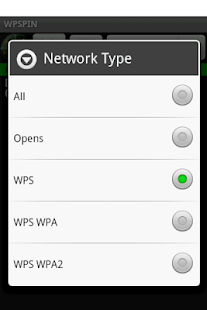
2. Search for available wifi network through this app and take a note of separate 8-digit wps pin numbers of wps pin available WiFi networks.

Done!!


Video for this trick

Make your android phone Auto capture the image when someone tries to Unlock it Using Hidden eye app


Android phones are filled up with a lots of security features,lock your phone with a Pin code,Password or Pattern,also lock individual apps on your phone using various locker apps,these all will let you prevent in authorized access to your device,only the person entering the correct pin or password can access your device,However our device doesn’t tells us if some one else tried to unlock it using a wrong pin,pattern or password,Today we are introducing an app ‘Hidden eye’ this app will automatically capture the the image using your front camera when an attempt to unlock the device using wrong pin,password or pattern is incurred,this will let you know who tried to access your device using a wrong pin or password,it will let you spotlight the people,who are trying to get through your privacy.


Hidden eye apps works in complete silent and undetected mode,it captures the screen shot if the attempts to unlock the phone is not successful,no camera shows up on your screen and also no sound is played for capture,it just clicks the image and saves it which can be viewed,managed from with in the app itself.

How to configure the app:-

In order to configure this app,just download it from the Playstore,after successful install,Switch on the security status button,activate the app by granting it the required permissions,within the app you will have three options to act upon.

Sound an alarm after three attempts,
Alert me on notification bar,
Show intruders on unlock.
Configure these options as per your wish,you can also click delete records to see and delete the records you don’t want to keep.


Once you start the app it runs in background and performs its tasks,The app will help you keeping a track of all the people who want to access your device,it is also recommended to keep changing your password every month,to ensure that no one is able to guess it

Hack-Fb-A-c-Using-Phishing-Method-on-Wapka-site2016

facebook-phishing-feature.jpg
Step1. Register a New Wapka Account First Create a new Wapka Account from the link below 
www.wapka.mobi 

Step 2. Go to manage then Admin Mode 

Step 3. Edit Site >>Mail form 
***Remember :Enable CAPTCHA pictures:Must Unmark it. 
**Now Press Submit 
Must Hide the mailform in Admin Mode How to Hide it on Admin Mode?? Ans: Go to Edit Site 

Step 4. User >Items visibility>Now click on x
Now its Done 

Step 5. Go to Edit Site >Global settings>Headtag Meta style> 
Put this Code. 


Step 6. Go to Edit site>WML/XHTML >put this code given below & set WML place in front at the Top. 
Replace the “roys036@ gmail.com” form ur E-mail ID & replace 2014 from 2015 

Step 7. At last After Finishing All Work Now U can Put This Code on your Site at Last…… For this code Wapka Advertise will be remove from foot of your site ….. 

Go to Edit site>WML/XHTML >put this code given below & set WML place in front at the end. 


note> Only for Education Perpuse ,PHISHING IS ILEGAL 

Sunday, 26 July 2015

Free Reliance to Reliance Mobile Calling for 1 Year

Again Live - Reliance Pvt. Ltd. India is Offering Free R2R Mobile Calling for 1 Year Absolutely Free of Cost -0 Just Follow below steps to get this awesome Offer . Please make sure that this offer is valid for Reliance Prepaid mobile users only.

This Offer is valid for Some Selected Reliance States Only - So Try if it works in your state do leave a comment below for others to avail this offer.
This Offer is Newly Updated by us - Working fine in many states of India .

How to get the offer ?


  1. Open Message Option in your Mobile Phone / Smart Phone :p
  2. Simply Create a New Message and Type the following things :-

    "R2R" 
    send it to "55874"
  3. If Success You will get a Confirmation message from Reliance.

Saturday, 25 July 2015

Book a bus ticket on redBus and get your coupon code for a free Ola ride of upto Rs.150.

Ola
Ola!
Heading out of the town soon? redBus and Ola are here to simplify your journey! 
Book a bus ticket on redBus and get your coupon code for a free Ola ride of upto Rs.150. What are you waiting for? Book now on https://www.redbus.in  and #ChaloNiklo
Steps to redeem coupon:
  • Book a ride on Ola App.
  • Enter coupon code provided by redBus in "APPLY COUPON" section.
  • Rs 150 will be deducted from your bill amount.

Terms and Conditions:
  • Offer is valid only from 3rd July - 31st July, 2015 
  • Coupon Validity date 3rd July - 10th Sep, 2015.
  • Discount of Rs 150 on a ride booked on Ola mobile app. 
  • Voucher can be used only once by a customer. 
  • Offer is valid only on select routes of redBus. 
  • Offer is not applicable in Bangalore, Chennai, Mumbai, Delhi, Chandigarh, Coimbatore, Pune, Hyderabad, Ahmedabad, Indore and Goa. 
  • Cannot be clubbed with any other offer.
  • The offer is not applicable on Kaali peeli, Auto and TaxiForSure rides. 

Wednesday, 15 July 2015

set any video in WMV/MPG format as the desktop wallpaper.


DreamScene Activator is a freeware from door2windows that allows you to activate DreamScene in all editions of Windows 7 & Vista. This is the only freeware on the web that has the desktop text bug fixed.
DreamScene is a feature that allows users to set any video in WMV/MPG format as the desktop wallpaper. This feature was only included in Windows Vista Ultimate Edition.

How to use:

  1. Run the tool as administrator.
  2. Click the slider. Wait until it says ON.
  3. Right-Click on any video in WMV/MPG format and select Set as DreamScene.
If you have run this app for the first time then restart your PC. Now the video that you selected will be set as the desktop wallpaper.

Tuesday, 21 April 2015

Prevent Fb Accounts from Being Hacked – Basic tips

There are a lot of ways to lose control of your Facebook account. You may get hacked and ultimately loose Control over your facebook account
Prevent Fb Accounts from Being Hacked
Certainly this is not the end of the world, but be aware that you can also be the victim of an attack by malicious softwares and hackers causing much more damage on your ​ ​Facebook account. It is very important to Prevent Fb Accounts from Being Hacked.Prevent Fb Accounts from Being HackedIndeed , while no software installed on your local system, there is nothing that your local antivirus can detect and your account may be hacked in one-of- hand trick, leading to all sorts of hassles and problems . So today in this article we will discuss some Basic Tips to Prevent Fb Accounts from Being Hacked.
Tips to Prevent Fb Accounts from Being Hacked
1)Application Permission

Whenever on Facebook you answer a quiz , install a Facebook game, or add any application , you will be forced to go through an intermediate screen showing what the permissions the application needs . These permissions can include almost anything, which may also include full access to your Facebook account , even when you’re not connected.

In other words, if you do not carefully read the permissions required , you might end up giving more than just personal information, so beware next time and Prevent Fb Accounts from Being Hacked !
2) Spammy Video links:

Also Beware of videos on Facebook, Spammers are targeting Facebook to Spread links of Spammy videos, Which on your click redirects you and takes control of your fb account to Spam on other fb comments, you might not be even aware that you have commented so and so thing on so and so palce.
3)Download Notification:

Sometimes when you start a video , you receive a notification that you need to install or update a codec , which is necessary and essential to watch the clip.
That may be true, but its often said that codec is actually a Trojan horse . For those who do not know , be aware that antivirus program is blocking it , although it could still slip through the net and suddenly be harmful for you. So be very smart when you come accross this situation and Prevent Fb Accounts from Being Hacked.

4) Message from Facebook:

If you own Popular Facebook pages, then you may even recieve Messages with names like : Facebook team, Security team, Facebook Security, etc, etc.

The Message would so legit that you will be Forced to click on Some link, Which are actually Cookie stealing apps and eventually you may end up loosing your facebook account so better ignore that message and Prevent Fb Accounts from Being Hacked.

No Facebook team will never Send you such messages, so Dont forget to Report that message.
Protect Yourself:

Facebook continues to work on security even within its platform, but the social giant can not help you to provide your personal information to play a game or a quiz . In addition, a local antivirus will not prevent this error.

Ultimately it is up to you to pay attention and Prevent yourself:

    Add your phone number and Change its privacy to Only me, So Even if there is any problem in your fb account you may easily get it back by making facebook send you Code to your Mobile. And Changing your Phone number Privacy to Only me Will make sure that other people will not be able to see your Phone number.

    Add Security Question as a Secondary option to get back your Facebook account. Choose a Question, Answer to which only you know. or add any other Unique answer which nobody knows but make sure you are able to remember it.

    Add People as Friends that you know personally, Many a times people on facebook adds many other people who they dont even know by thier face. Facebook Asks you to identify Friends in which they are Tagged in.

    Turn on Notification when you log in to your facebook account, so whenever you login, you get a mail from facebook with information about time, date, Operating system and Browser.

    Change your Password Frequently, It is said that you must Use your  Password as your Toothbrush. So keep changing it Frequently to Prevent Fb Accounts from Being Hacked

So these were some Basic Tips that Facebook users must Consider in order to keep thier facebook account secure and safe. i hope this helps.

Customize folders with different colors in Windows

There are many softwares available today over the internet which can Customize your Computer in an efficient manner that it looks so attractive as well as it becomes very easy to use. We always want our computer to be clean and well organized so that whenever we need to access something or need to search a particular file/folder in our computer we could find it easily.

https://blogger.googleusercontent.com/img/b/R29vZ2xl/AVvXsEgoTAbgVW__qy7bLzQfxYbBEQGTGluMmN5wHuO6xwXAXzDLwemNOaEOph5cut21yWp6HhkD6Pr08JFrlbpWrwDWAXUi2vRQKuWHv53Eub_j5GR1pq8pnfPe7Lrve4pgbgiNQePjl_Y4mNA/s1600/customize+folder+windows.JPG

As similar to that, here I am going to share a software through which you can easily assign your favorite colors to your desired folders in order to differentiate them easily and to ease of access.

Customize folders with colors
How do i Customize folders with different colors ?

Just follow the two simple steps given below to customize your folder :
Step 1 :

First of all Download and install the software FolderColorizer. It is tested and 100% virus free. You can download it from here : DOWNLOAD FOLDERCOLORIZER

Step 2 :

Now after installing the software, simply right click on any folder which you wish to customize. Here when you right click on folder, you will see a new option in the context menu i.e. Colorize !. Now simply go to that option and one submenu will appear. Now choose any color you want to assign to this folder.

Although it is a free software for everyone to use it but while you will use this software for the very first time , it will just ask your email id for activation of this software. But no need to worry because you wont need to confirm the activation by logging in to your e mail account. Even if you don’t wish to share your e mail id with developers of this software you can do it because product will be activated automatically once you enter any email id. So you can also enter any fake id if you want.

For your convenience I am providing you a screenshot of above mentioned procedure for changing folder color :

Customize folders with different Colors

In this way you will be able to easily organize folders in any of your drive weather C: , D: or any other drive. You can also assign different colors to several folders in the same drive to give it more attractive and cool looks.