Sunday, 26 June 2016

How To Recover Data From Crashed Operating System

In this method, we will be discussing a way to recover  the data before installing new OS that is gonna delete all your data installed in the drive containing OS. So have a look on the steps discussed below to proceed.

For windows users, we are here with a cool method for How To Recover Data From Crashed Operating System. Due to viruses or any other factors, our operating system gets crashed in general cases and then you can’t access your valuable data. However, the worst case when you have your important data on your drive where OS is installed. Because whenever you install a new OS then the drive gets formatted and all your data get deleted. So here we have a way by which you can recover your lost data in crashed OS.

Steps To Recover Data From Corrupted OS

Step 1.

First of all download the Windows 7 USB/DVD Download Tool. This tool is available for free of cost by Microsoft Corporation. Don’t worry about software’s title that is Windows 7 this software works perfectly fine with Windows 7,8 or 8.1 and windows 10.


Step 2.

 Now you have to install the downloaded software. After installing it now you have to run it. Now in the opened window as shown below click on browse. Now locate the path of Windows ISO file and select it then click on next button.


Step 3.

Now in the next opened window you have to click on USB device because we are making bootable USB/Pendrive.


Step 4.

The next thing is that you have to select the Pendrive  which you want to make bootable. Make sure that your Pendrive is empty. If not so then don’t worry a pop-up will open saying to erase data on your selected USB.


Step 5.

Now the only thing you need is to just copy windows files to do so you have to just click on Begin Copying. It takes approximately 20-25 minutes depending upon your system on making bootable USB. Finally, when you see the message “Bootable USB Device created successfully”.


Now boot this Windows USB on your pc and open recovery option and browse  there and move your important data in your Pendrive.


  • So above is all about How To Recover Data From Crashed Operating System. By using this method, you can easily recover your C drive data without installing the new windows and loosing all your important data. Hope you like this, keep on sharing with others too.Leave a comment below if you have any related queries with this.

Saturday, 25 June 2016

Airtel 4G/3G/2G Free internet trick with netify android vpn handler June -July 2016

 today we are sharing a new vpn trick for airtel free internet. i think most of you now familiar with vpn tricks. The main advantages of vpn tricks are, by vpn trick you can use free internet as same as normal paid internet. In case of proxy tricks, we cant browse some sites, such as facebook.com , gmail.com etc. and also in proxy tricks, we can only enjoy free internet on the browser. But for vpn trick, there are no such problems. Here I am sharing airtel new free 3g internet vpn trick using Netify VPN app. Netify VPN app is an android apk application. Netify is same as psiphon handler. but netify is more advanced than psiphon handler. This airtel free internet trick June  2016 works with netify android vpn handler. The full trick is described below.

Follow steps:

1. First you need to download netify vpn handler android app
2. Install and open netify vpn app
3. Now do below changes in netify vpn handler menu
>> Give Tick on Remove Port
>>  Enable Proxy Type: Real Host
>> Set custom header: X-online-Host
>> enter Proxy server as - 125.21.246.113
4. Now save settings and connect on netify vpn app
5. wait for the successful connection. enjoy free internet with netify vpn app on airtel sim

  • Limit 100-250 per day 
  • Don't download big files at a time.


This trick is working in many states. try in your state, and share the result in below comment section. happy to see your valuable comments.

NOTE - WORKING CONFIRMED IN  KERALA, HARYANA ,RAJASTHAN (JAIPUR)

TRY ON YOUR STATE. THIS IS WORKING NOW IN MANY STATES... TRY IT FAST.. SHARE YOUR RESULTS ON COMMENT BOX BELOW
PROOF OF NETIFY VPN [ AIRTEL FREE INTERNET] CONNECTED

Friday, 24 June 2016

HOW TO WRITE BOLD, ITALIC TEXT IN WHATSAPP MESSAGE

This is new WhatsApp features and is for all WhatsApp user whatever he use Android device, Java Phone, Blackberry Smartphone or iPhone Os.

How to Write Bold text in WhatsApp ?
I am 100% sure that you have seen bold letter in WhatsApp. Did you try to write bold text in Whatsapp ? Well, Don’t Worry because i am here. Follow below process to write bold word/sentence in WhatsApp :


  1. Open WhatsApp App
  2. Go to any group/friend to whom do you want to send bold text
  3. Write * before and after the word/sentence.
  4. Ex: If you want to bold this roysfan then write *Roysfan* and send it .
  5. WhatsApp program will auto change *Roysfan* in Roysfan bold text.
  6. That’s the way for writing bold text in WhatsApp.

How to Write Italic text in WhatsApp ?

  1. Do the same as told in above but only you have to change from * to _ (underscore) .
  2. See below process to write italic word in WhatsApp :
  3. Firstly Go to WhatsApp Messenger
  4. Then select any group/friend to whom do you want to send italic text
  5. Write _ before and after the word/sentence.
  6. Ex: If you want to italic this Roysfan then write _Roysfan_ and send it .
  7. WhatsApp program will auto change _Roysfan_ in Roysfan italic text.
  8. That’s the way for writing italic text in WhatsApp.

Paytm Offer : 40% cashback on hotel bookings

Paytm

Offer : 40% cashback on hotel bookings
  • Coupon Code : HTL40 
Landing Page : https://paytm.com/offer/htl40/


Valid till : Offer lasts


Terms and conditions :

  1. No minimum order value.
  2. Cashback will be credited within 24 hours of the transaction.
  3. Promo code valid multiple times per user.
  4. User needs to have verified mobile number on Paytm to get cashback.
  5. Cancelled orders will not be eligible.
  6. Offer valid once in a day thrice in a month per user
  7. Offer not valid on hotels listed by OYO Rooms.

Thursday, 23 June 2016

Trick to Reduce High Data Consumption on Android Smartphones

data is being consumed in background in android system, well see you know that every app or mainly many of those has a ability to interact with internet to receive / send some or the other data, you might be not knowing that while installing any of the app weather you have install online from Google play store or downloaded offline you are the one who grants permission to send/receive data.
These were the common reasons of background data usage now moving ahead let’s talk about solving this issue, its simple to stop restrict background data just follow the simple steps below.

For your reference we have added screens below :


  • Navigate to : Settings -> Data Usage -> Press menu and check (tick) on Restrict background data.


That’s it after doing this you will be getting small triangle over your notification panel just ignore while you have restricted your data, if you click on that your restricted data will be auto enable, its pretty annoying having a triangle with an exclamation mark anyways you have to keep that to save your data balance.

Here are the screenshots how to restrict you background data consumption :


Many of the things has one or the others advantages and disadvantages this process all has its own let’s discuss about one by one.

Advantages :
- Save lots of data.
- Helpful when you are browsing, generally you experience fast browsing speed.

Disadvantages :
- Notification from Apps like WhatsApp,Twitter, Facebook etc are not allowed while you have a enable data restriction.
- Won't access to Play store requires background data.

Saturday, 18 June 2016

Paytm:- Get Rs. 30 Cashback on Vodafone U recharge Packs

Paytm is offering great cash back offer for Vodafone users. Now recharge your Vodafone number with Vodafone U recharge pack and get Rs. 30 cash back. The U recharge packs will vary from one region to other so see the below pic and procced accordingly


Steps:-
1) Visit paytm.com

2) Now initiate a recharge of Rs. … show above based on your region

3) Login / sign up to your paytm account

4) Apply the promocode URECHARGE

5) After successfully applying the promocode then proceed to pay

6) cash back will be added in your account with in 24 hours

Vodafone U Recharge packs Medium Pack Details:-

300MB Data + 150MB Night data (12am to 6am).

  • Call to 3 vodafone buddies 20 paisa min.
  • Talktime of Rs 15.
  • 60MB Data loan if you run out.
  • Unlimited music download from Vodafone Music for first 2 months.
  • Validity 14 days.   

  • Vodafone URecharge packs Large Pack Details:-


  • 800MB Data + 200MB Night data (12am to 6am).
  • Call to 3 vodafone buddies 20 paisa min.
  • Talktime of Rs 15.
  • 60MB Data loan if you run out.
  • Unlimited music download from Vodafone Music for first 2 months.
  • Validity 28 days.

2016 Best Hacking Apps for Android Phones

The world is full of smartphones these days. Most people rely on their smartphones and other portable devices to carry out their day to day activities. It won’t be an exaggeration to say that smartphones have taken over laptops in terms of productivity. Thus, it becomes extremely important to know about the (ethical) hacking tools available on your android phone. Who knows, you might need them one day!


Hacking, nowadays, is not something which is the exclusive domain of the “experts”. With the help of a few applications and basic knowledge of the true capabilities of your android phone, you, too, could delve into the world of hacking. So, let’s discuss some of the apps for your android phones which will turn you into a hacker!

1. ANDRORAT

AndroRat stands for Android Remote Administration Tool. As the name suggests, it is a remote administration tool which is used to control another device even if you have no physical access to that device! Manipulating other devices can be easily done using the app which is quite useful in case you’re away from your device and need it to perform some task. It is also useful in inducing some giggle and amazement amongst your friends and family members!

2. DROIDSHEEP

The word “hacking” for many is hacking into your friend’s social media account for giggles. Or it may be used for even something useful like extracting some important information from someone’s social media accounts. DroidSheep does the job for you. It hijacks the sessions of social media activities carried out on your network. You need the knowledge of the basics of hijacking and by installing the app on your android device you’re all set to ‘hack’ your friend’s online social life!

3. KILL WIFI

This open source ethical hacking app is one of the most popular ones in this field. Similar to the net cut app in Windows, this app is capable of cutting off anyone’s WiFi over your network. Kill Wifi is extremely useful when you have an open WiFi not protected by a strong password. You can cut off the WiFi of the intruder by just a few clicks on your device. This app is easy to use owing to its lucid and interactive interface and easy-to-use tools.

4. SPOOFAPP

Won’t it be wonderful if you could place a call to your friend phone, but instead of showing your phone number different number flashes on your friend’s phone?SpoofApp is exactly what this app does. Apart from changing your phone number, this app can also change your voice and record your entire conversation! However, you will need SpoofCards to use this app. Overall a nice app for bringing smiles on your and your friend’s face.

5. WIFI MAC CHANGER

One of the most useful ones, Wifi Mac Changer app changes the MAC address of your device you make your activities almost untraceable. With your rooted android phone, you can change the MAC Address of your device temporarily so that your online activities cannot be traced back to you. The app provides you two methods of changing your MAC Address. One is the easier way which reflects no change in your WiFi settings. The other method is a bit tougher which allows you to enter apps which are password protected and this will reflect the changed address in your WiFi settings.

CONCLUSION

These apps may not seem very productive at a first glance but with prolonged use, you will certainly realize the potential that these apps possess. Who knows someday you may need to spy upon your friend’s/significant other’s social media account? Or you may need to kick off an intruder from your network. Thus, gear up for the path untraveled and watch your world in an entirely different light using these apps!

Thursday, 16 June 2016

How to Bypass Phone SMS Verification on any Website/Service

Sometimes putting up your phone number to a website while creating any account could be a troublesome task as your private number can be leaked through many sources. Therefore, we are here with a trick to Bypass SMS Verification Online on Websites. With the help of listed 8 websites, you can easily bypass SMS verification process.


Today while creating accounts on numerous websites you need to confirm your phone number through verification SMS, but sometimes you might notice that the website is not much secure to bestow your personal mobile number with them. As your private number can be leaked through some untrusted websites by their data exposure. So alternative method to avoid all this is bypassing this verification. In this method, you don’t need to enter your personal number for verifying, as you will have to use an artificial verification number. So this method is very tricky and absolutely works, which you will get to know after reading the below method.


Firstly let me clear one thing, you should not go for this bypass SMS verification if you want to verify for some trusted networks like Gmail, Yahoo, Facebook and all other. And this method is very modern to bypass SMS verification at some promotional networks where there is a risk of your number being leaked. So just follow up the below steps to proceed.

You Just need to visit any of the site listed below, as these websites are perfectly bypassed the SMS verification.


Here are the list of these sites:>
http://receive-sms-online.com/

http://www.receive-sms-now.com/

http://freesmsverification.com/


http://receivesmsonline.com/


http://hs3x.com/

Wednesday, 15 June 2016

Panel Station- Get Paytm, Freecharge, Flipkart Vouchers For Doing Surveys

Panel Station is a online platform that pays you for completing surveys. Take small surveys and collect reward points. These reward points can be redeemed to get Paytm cash, Freecharge vouchers, Flipkart and various Gift cards of various eCommerce sites of India.
This site is very good for regular basis earning.


Steps to get the offer-
* Goto offer page

* Fill all required details and register your account.

* Now you will receive a verification email.

* Verify your account by clicking on verification link sent to your email address.

* After verification you will receive another email containing your password.

* Now login to your account.

* Every survey gives you reward points ranging from 100 to 5000 depending on the complexity and length of every survey.

* Now within Few hours you receive your First survey now start doing your survey .

Note-

They send email invitation to participate in new surveys, so keep checking your email daily.


Few Notes-
* 100 Points – 10 Rs

* You need minimum 3000 points in your account to start redeeming.

* 32 India cities people is eligible for this offer. So select your nearest city during registration.
Ahmedabad, Delhi, Mumbai, Bangalore, Chennai, Hyderabad, Kolkata, Coimbatore, Indore, Lucknow, Pune, Patna, Jaipur ,Bhubaneswar, Bhopal, Faridabad, Kanpur, Meerut, Nashik, Surat, Nagpur, Baroda, Chandigarh, Ludhiana, Varanasi, Rajkot, Ranchi, Guwahati, Mangalore, Guwahati, Amritsar, Kochi/Cochin.

Thursday, 9 June 2016

Oxigen Wallet Offer- Get 20 Rs. Cashback On Adding 10 Rs. to Oxigen wallet (New Users)

Oxigen Wallet Offer For New Users – Get 20 Rs. Cashback On Adding Rs. 10 to your wallet . Oxigen wallet is one of reliable virtual Card provider and it has offered many awesome offers especially for their customers. It is highly Trusted app so avail this offer ASAP  . Offer valid till 25 june only and for new users only.


Steps to get Rs 20 cashback on adding Rs 10 in Oxigen Wallet –


  • First of all, Open your messaging application from your smartphone
  • Now type a message as  “ SALAM ” and send it to to 9731888888
  • You will instantly receive a message with a download link to oxigen wallet app
  • Click on the link and you will be redirected to playstore to download the app
  • After the app gets installed , open it and sign up by providing suitable details and same mobile number
  • Tap on add money , Enter amount as 10 and proceed
  • You will be redirected to Payment page , Pay using suitable payment mode
  • After you complete your transaction you will get Rs 20 cashback within 48 hours

Wednesday, 8 June 2016

OnePlus 3 VR Headset In Just Rs.1 On 3rd June(close)

its a great opportunity to grab OnePlus 3 VR Headset for just Rs.1 on 3rd June at 12 PM and 7th June at 12PM. Original price of this VR Headset is more than Rs.2000 but as a launch offer, they are offering it in just Rs.1 for first 30,000 customers so let's proceed and check out how to grab this awesome deal.


Its a App Only offer so you need to download Amazon App first.

DOWNLOAD AMAZON
OnePlus3 VR Sale Live At 12PM

Click Here To Register For Sale 


Terms & Conditions :-

  • Only Registered customers will be able to check out successfully.
  • Only one device is permitted per customer.
  • So do not forget to register and be alert at sharp 12PM Today & 7th June.

Tuesday, 7 June 2016

Pokkt App Unlimited Recharge Trick and refer get 40rs.

Hello Visitors, We are Back With A New Pokkt App Unlimited Recharge Trick Which Is Giving So High Refer And Earn Amount. You Can Easily Earn Rs 1000 of Recharges with this pokkt app trick. we are presenting Pokkt app Unlimited Free Recharge trick, Every one who want to loot is needed Donkey Guard . IMEI changer and pocket money app.

Pokkt App Unlimited Recharge Trick

Trick To Earn Unlimited Mobile Recharge Using Pokkt Money App As Rs.90 Get Unlimited Free recharge from Pokkt pocket money app with Bluestack for pc install app & Enjoy Recharges With Unlimited Trick Loot Pokkt App–Unlimited Recharge Trick Pocket Money Pocket Money Pokkt free recharge loot trick,pokkt refer and earn loottrick, pokkt unlimited loot trick, free recharge app loot trick.

Steps For Pokkt App Unlimited Recharge Trick


  1. First Download Pokkt App from here – Click Here. (If you already have Ignore this Step – But make sure its updated).
  2. Sign Up / Sign in to your existing account.
  3. Enter your Mobile Number & verify OTP.
  4. ↓↓↓↓Now Main Trick Start From Here↓↓↓ (Rooted Phone Required)
  5. Download This IMEI Changer Ι Donkey Guard app Ι Apk Extracter(For Backup)
  6. Activate IMEI and Donkey guard from xposed.
  7. You Will see offers like amazon, buy hatke, Flipkart etc in Pocket Money App
  8. Open Buyhatke offer and it will redirect you to Google Chrome, now just click on allow button in chrome, within a minute you will get Your credit instantly.


  1. Download more apps like  amazon, flipkart apps and you will get Rs 20-30.
  2. Now Recharge your mobile number with Rs 20-30
  3. Now Make Backup of amazon and flipkart app (Don’t Backup Lookup App)
  4. After Backup, clear data of pocket app from settings>apps manager.
  5. Now Open Donkey Guard app and Chnage identity of pocket money app like Device id, Sim serial Number, subscriber id.
  6. Now Change imei Number through Imei changer app.
  7. Close all Apps and Open pocket money app and again login with same number.
  8. Clear data of google chrome
  9. Now Again complete Buy Hatke offer.
  10. Now click on amazon install it through backup ,download lookup app and Now click on Flipkart app install it through backup , You will get Rs 20-30.
  11. You can loot unlimited without downloading Amazon & Flipkart App . You have To download only lookup App of 5.00MB.
  12. Now Repeat above steps from 9th to 13th and loot it with unlimited times.
  13. Enjoy This pocket App unlimited Trick
Refer and Earn:-

Note download your refer link and short link . & share with your fends.
Get 40rs for successful refer.

Proof redeem:-

Sunday, 5 June 2016

Get 75% Cashback On Your First Transaction On Freecharge || Refer & Earn More Freecharge Credits

Freecharge Refer & Earn is now updated. Now you can again recharge same number and same debit/credit card to avail 75% cashback and maximum cashback is Rs.50. Just like earlier, now also you can earn upto Rs.5000 by referring your friends.


Along with this Refer & earn offer, all new users can grab flat 75% cashback on minimum recharge of Rs.50 by using your friend's referral code. Scroll down and find out code to grab this awesome deal.


Steps To Follow  :

1. Update Freecharge application or Download latest version from Here .


2. Once you download, open it and register new account.

3. Now proceed to recharge with Rs.50 and in promo code, enter this code to get 75% cashback  : R1NQ88R .

4. Once you apply above code, you can see success message "Promo code applied successfully...".

5. Now proceed further & make the payment via Debit or Credit card.

6. After successful recharge, you will get 75% cashback maximum Rs.50 in your Freecharge account instantly which can be used for recharge or you can shop using that cashback amount on Snapdeal website or even you can transfer that money in Bank account using GoMastercard feature.

How To View Saved Wifi Passwords In Android (2 Methods)

Android device is very smart and intelligent. You may have saved lots of password on your android device. Actually, all these passwords get saved in the internal reserved memory of an android device. Especially, if you are having multiple WiFi connections, then it’s pretty common to forget wifi Passwords. So we are going to share two methods, one is for rooted and another one for non-rooted android devices that will help you get back your forgotten Wifi passwords


#1 Method: Using ES File Explorer

Step 1. First of all, you need a file explorer that gives you the read access to the root folder. If your default File manager doesn’t give you the read access to the root folder then you can install ES file Explorer which will grant superuser premission to you the access to the system folder

Step 1. Go to data/misc/wifi folder and you will find a file named wpa_supplicant.conf.


Step 2. Open the file and make sure you use ES File Explorer ‘s built-in text/HTML viewer for the task. Now in this file, you will be able to see the network SSID and their passwords next to it.


Now note down the network name and its password. In this way, you will be able to view all saved wifi password on the android device.

Note: Please do not edit anything in wpa_supplicant.conf as it can alter your device working or it will have the effect on your wifi connectivity.

#2 Method: Using Wifi Password Recovery(Root)

Wifi Password Recovery is the free tool that requires root access to recover saved passwords in your Android smartphone. You can use this tool to backup all your wifi passwords on your device

Wifi Password Recovery Features

LIST, BACKUP & RESTORE all network’s (WiFi) password saved on your device!
Show SSID and Password on fullscreen (for easy viewing and sharing with others)
Copy WiFi Password to Clipboard (to be able to paste anywhere)
Show QR Code (to another device scan and access the network)
Share password through SMS or Email
How To Use Wifi Password Recovery?

Step 1. You need to download Wifi Password Recovery App on your rooted android smartphone.


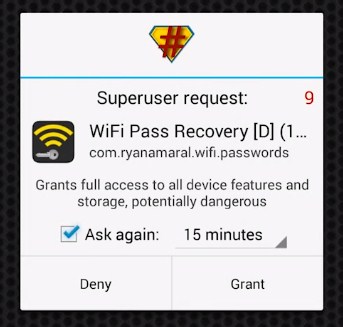
Step 2. After you installed it you need to grant the Root Permissions.


Step 3. Now you can see all your saved wifi password listed with SSID Name and Pass. If you want to copy the password simply tap on the network and then select “Copy password to clipboard“


That’s it you are done! this is the easiest way to know saved wifi passwords in your android smartphone.

There are many apps in Play Store which can perform the same work, but Wifi Password Recovery is the best one because it is easy to use. If you face any problem or need help at any steps please comment below. Don’t forget to share it with your friends too.

Sunday, 29 May 2016

Just Loot App : Refer & Earn Unlimited Paytm Cash & Recharge

JustLoot is a free Incentive App for all android users. Get rewarded with free Mobile Recharge and Postpaid bill payments by discovering and exploring apps/ games through JustLoot app.

As a promotional offer, now they are offering Refer & Earn offer through which you can earn free recharge & Paytm cash so let's proceed and check out this newly launched app.

Steps To Follow :

1. Download JustLoot App & get 1400 SignUp Bonus point from Here .

2. Once you download, enter your number & verify it.

3. After successful verification, you can see 1400 JustLoot Points in your account.

4. Now start referring your friends from Menu -- Refer To Earn section.

* Per referral you will get 1400 JL Points.

* Redeem your earnings in form of Recharge or Paytm Cash.

Point Redemption :-

2000 Points : Rs.10 Recharge.

4000 Points : Rs.20 Recharge.

10000 Points : Rs.50 Recharge Or Paytm Cash.

20000 Points : Rs.100 Recharge.

To Redeem Paytm cash, goto Redeem -- Money Transfer and enter your Paytm account Number.

* Paytm amount will be credited instantly.

Friday, 27 May 2016

Download My Vodafone app&Get Absolutely free 100 MB Data


Get free 100 MB Data for Downloading My Vodafone app:

Vodafone is back with another promotional offer for its app,
Users just need to install ‘My Vodafone’ app and signin ,

The offer is valid for the first time download and signin,

you will get absolutely free 100 MB data credited to your Vodafone number,My Vodafone app let’s us easily manage our Vodafone account Recharge your mobile,Get special offers,Transfer balance ,request service,get the best plan suggestions and more,


My Vodafone app is available for android,iOS,Widows phones,Nokia phones as well as Blackberry,


To avail the offer just head to the landing page and download the app.

How to Kill your Friends or Neighbor’s WiFi Connection With WiFi Kill app

After some Time, we are back again with a new trick for Android, in which you can kill your friends or neighbor’s wifi connection, they will still connect to the wifi but they will not able to Browse or download anything. Then you can make some more fun by telling that wifi is working in your Phone.

Requirements Before using this app :

> Rooted Android Phone (Most Important) –
> Android Version Must be 4.x+
> WiFi kill app – Download Link Below
> Unknown Sources must be enabled. go-to Settings – Security – Tick on Unknown Sources.
> Wi-Fi Must be Connected in your Phone, which WiFi connection you want to Kill.

How to Kill your Friends or Neighbor’s WiFi Connection With WiFi Kill app 

✰ At First, you have to Download – wifikill app for rooted android
✰ Now Launch WiFi Kill app from your App Drawer, it will ask you for Root Permissions, Simply tap on Grant Button. if your phone is not rooted properly, then this app will show you fail message, now after Give root Permissions Successfully now Click on “▻” Symbol which you will see at top of the app, This Symbol is made like play button.

✰ Then It will Start Scanning & Will Take some time & you have to Wait some time, it will take approx 1 minute to scan your WiFi fully.
✰ After Scan Success , It will show you IP Address of Modem Like – “192.169.0.101” in my case, it may be different in your case, don’t worry.

✰ Click on IP Address & It will open a new window from here, Now Click on “Grab” Button, After that Click on “Kill” Button.

✰ That’s all you are done, now your friends will not able to use WiFi connection, They will still connect to WiFi but they will get speed like 0 Kbps & Can’t able to browse or download anything.

For Revert Back 

✰ Untick on “Grab All” Button, After that Click on “Kill” Button
✰ Then Go-to Main Screen Of app & Click on “❚❚” Symbol Normally
✰ Now Your friends , Neighbors can use WiFi Normally as before they was using this.

Snapdeal- Buy Feature Phone With Camera At Just Rs.479

Here is a good deal for you if you want to purchase a good simple phone at very low cost. Snapdeal is offering Peace P1 Black at just Rs.479. Features of the phone are good. This phone has dual sim slot and 0.3 MP rear camera. At low cost these features are outstanding.


How to Buy-
* Goto offer page

* Click on Buy now.

* Login to your account or register a new account.

* Fill or select your shipping details.

* Make payment and complete your order. You may also order using cash on delivery payment method.

Airtel : Get 1000 Minutes Free Calling Between Your Family Members

Airtel is the India’s leading provider of prepaid & postpaid, wireless internet, broadband, fixed line, digital TV & mobile services. Airtel has come up with amazing “Airtel myPlan Family Offer” where it is offering 1000 Mins of Free Calling between your family members. Valid for Postpaid Airtel Users.

How To Get This Offer ?

  • Visit Offer Page.
  • Enter Name & Contact Number.
  •  Click on “Get a callback”.
  • You will get a callback from Airtel.
  • Activate Your Plan, You have to pick the rental and choose the free benefits that each family member needs.
  • Now include your family in the plan & start sharing!
  • What You Get With This Plan ?
  • Enjoy free calls upto 1000 minutes per months.
  • Save 30% on mobile bills
  • Share your plan at just Rs. 199/year
  • Have one plan for all your devices
  • Add up to 5 family members to your plan

Sunday, 22 May 2016

(Expired)Refer & Earn Rs.10 Paytm Cash Per Referral From Zapstore

Zapstore is world's only social cashback website. Through Zapstore members can save on regular purchases at any of our partner retailers. To earn cashback, please ensure you click-through to the retailer's website via blue/orange buttons on Zapstore site. You can also refer products to friends on various social network and will earn a very lucrative referral fee once the receiver or anyone on his network buy the products suggested by the referrer.

As a promotional offer, ow they are offering Rs.10 Paytm cash per referral once you SignUp on Zapstore so let's proceed and check out more about this referral offer.

Steps To Follow :

1. SignUp On Zapstore website from Here .

2. Now enter all required details and on next page, verify your number.

Note : Use same number for verification which is registered with Paytm account.

3. After successful verification, goto My Account from top right corner tab and then select "Refer Friends".

4. Now note down your referral link & earn Rs.10 Paytm cash per referral.

* You can also earn more Paytm cash by sharing product on Facebook.

* Paytm cash will be credited in your Paytm account within 24 hours.

So refer more friends & earn unlimited Paytm cash from Zapstore.

Hope you loved this new way to earn Paytm cash. Do not forget to comment down in case you face any difficulties.